This website stores cookies on your computer. These cookies are used to improve your website experience and provide more personalized services to you, both on this website and through other media.
Accept
EdTechReviewEdTechReview
  • News
  • Trends
  • Insight
  • eLearning
  • Research
  • Dictionary
  • EdTech Voices
  • More
    • Data & Statistics
    • Reviews
    • AWS for Education
    • Events

    Resources

    • Infographics
    • Reports & Case Studies
    • Videos
    • Books
    • Webinar

    Needs

    • 1:1 Learning
    • 21st Century Education
    • 21st Century Leadership
    • 21st Century Learning
    • 21st Century Teaching
    • 3D Printing
    • More Tags

    For

    • Students
    • Teachers/Educators
    • Administrators
    • Entrepreneurs/Startups
    • Govt. Officials/Policymakers
    • Parents
Explore
Search
Contribute
  • Submit A Post
  • EdTech Trainers and Consultants
  • Your Campus EdTech
  • Your EdTech Product
  • Your Feedback
  • Your Love for Us
  • EdTech Product Reviews
ETR Resources
  • About
  • Mission/Vision
  • Team
  • Services
  • Testimonials
  • Authors
  • Sponsor
  • Partner
  • Advertise
  • Our Clients
  • Media Kit
  • Press Release
  • FAQ’S
Reading: edcanvas – digital content creator
Aa
EdTechReviewEdTechReview
Aa
Search
  • News
  • Trends
  • Insight
  • eLearning
  • Reviews
  • Dictionary
  • EdTech Voices
  • Data & Statistics
  • Research
  • AWS for Education
  • Events
  • EdTech Voices
  • Tags
  • About
  • FAQ’S
  • Our Clients
  • Partner
Follow US
Home > Reviews > edcanvas – digital content creator
Reviews

edcanvas – digital content creator

Editorial Team Published May 6, 2013
Share
13 Min Read
edcanvas - digital content creator
SHARE

Once a user clicks on the create new canvas button, the system takes them to the work area where the actual designing of canvas takes place. The first popup option asks the user to enter the name for the canvas and suggests names if the user is not sure what to put in. Also, the user can click the link at the bottom of the popup to see canvases created by other users. The title of the canvas appears at the top of the canvas editing area and by clicking on the name users can easily edit the name of the canvas.

AdvertisementWhy this Ad?

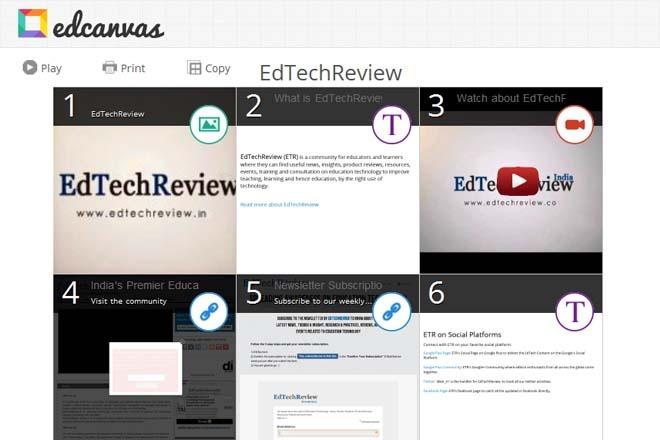
The canvas is basically a tile based layout. By default the system loads the square template, which is nothing but 3×3 square tiles arranged closely together to start off with. Within the editing screen, a toolbar at the top offers features to change the template (change the layout of the tiles), theme (to switch between a black and white or coloured theme), play (to preview how the canvas will actually look when someone views it), printing (to take a print of the canvas in a slide layout), subject (to add a canvas to a particular pre-defined subject and also assign a grade level to it) and share (to share the canvas across the web through URL, code embedding, sharing over facebook and twitter and through e-mail). Additionally, there is an option to share directly on Edmodo and also the user can use the QR Code to share the canvas. Also, if the teacher has already created a class, the canvas can be shared with the class also. This share button also provides an option to set different view permissions for the canvas like only me, public or for people with the link.

Talking about the actual digital content creation using edcanvas, the user can use the simple drag-drop feature of the platform to add different multimedia content from the right resource panel where all the links to different resources are present. The right column allows the user to search and select content like videos, images, web-pages, web-search results, bookmarks, multimedia files and more not only from the local PC of the user but also from the most popular platforms like Google, Flicker, Youtube, Educreations, Gooru, Dropbox and Google Drive .

At the bottom right corner of the screen, there is a ‘settings’ button that allows the user to either allow viewers to comment on the canvas or not. Also within this, there is an option to “Track Views on this Lesson” along with a sorting option to only track views from a particular class.

On the canvas, the tiles are very neatly arranged and as a user hovers the pointer over a tile, the utility option pops up. Using this option a user can add, delete or edit (name and description of the tile) a tile. One of the best features of this platform is the ‘Add Quiz’, which is a default system functionality of the system and can be used for any tile. Though the Quizzes are only multiple choice based, but they can be very useful for the teacher to keep a check on the students while they are going through the canvases as the questions will keep them focused on the content. Also the questions help the teachers to keep track of the students understanding of the topics being covered and also help focus on the progress of each student. Additionally, a canvas is autosaved on every edit, therefore the user need not worry about saving the contents after making changes.

Once a canvas is ready, the teacher can use the ‘Play’ button from the top menu to view how exactly the canvas looks.

For a viewer, the canvas comes up in a neat tile based format. When a user clicks on the tile of any tile, the contents of the tile are shown in a full screen mode with an option to go to the next tile and with an option to add comments in text or voice format if the creator of the canvas has enabled commenting.

Continued on next page…
Previous Page123Next Page
TAGGED: Assignments, Exercises, Worksheets, Content Curation, Educational Content, Formative Assessment, Free Apps and Tools, Lesson Planning, Students, Tools in Education
Share This Article
Facebook Twitter Whatsapp Whatsapp LinkedIn Reddit Telegram Email Copy Link
By Editorial Team
Follow:
EdTechReview (ETR) is a premier media platform and community for educational stakeholders to connect and find useful news, information and resources on educational technology having a niche subscriber base of 120K+ and an annual readership of 3M+ from over 220 countries and territories across the globe.
Previous Article Socrative Formative Assessment Tool For Your Classroom Socrative: Formative Assessment Tool For Your Classroom
Next Article Interactive Infographic History of Social Media [Interactive Infographic] History of Social Media
AdvertisementWhy this Ad?

Latest EdTech News To Your Inbox

Stay Connected

AdvertisementWhy this Ad?

Latest EdTech News To Your Inbox

Stay Connected

AdvertisementWhy this Ad?

You Might Also Like

How to Create Consistent AI Videos with a Reference-to-Video Generator
Reviews

How to Create Consistent AI Videos with a Reference-to-Video Generator

Sep 2, 2026
Why AI Lesson Planning Tools Are Only Solving Half the Problem
Insight

Why AI Lesson Planning Tools Are Only Solving Half the Problem

Aug 31, 2026
Best online career counselling in India  CCO counselling session with student and parents
News

Best Online Career Counselling in India 2026: Why Career Counselling Online Is the No.1 Choice for Students and Parents

Aug 21, 2026
Best English Speaking Apps in 2026 Which One Fits Your Goal
Reviews

Best English Speaking Apps in 2026: Which One Fits Your Goal?

Aug 10, 2026
The Hidden Cost of Always Giving Learners the Answer
Insight

The Hidden Cost of Always Giving Learners the Answer

Aug 7, 2026
Training Video Software Is Quietly Replacing the Course Production Studio
Reviews

Training Video Software Is Quietly Replacing the Course Production Studio

Aug 4, 2026
Whats Actually Costing Students Their Spot at University The Most Common Rejection Reasons in 2026
Insight

What’s Actually Costing Students Their Spot at University. The Most Common Rejection Reasons in 2026

Jul 10, 2026
How Students Can Turn Learning Into a Job-Ready Resume
Insight

How Students Can Turn Learning Into a Job-Ready Resume

Jul 8, 2026
Show More
EdTechReviewEdTechReview

H433, 2nd Floor, Vikaspuri, New Delhi, India, 110018
Phone: 011 41321030

Follow US

Copyright © EdTechReview. All Rights Reserved.

  • Home
  • Advertise
  • Event Associations
  • Press Release
  • About
  • Services
  • Contribute
  • News
  • Trend & Insight
  • Data & Statistics
  • eLearning
  • Reviews
  • Research
  • EdTech Voices
  • Dictionary
  • Tags
  • Resources
  • Events
  • Courses
  • EdTech Product for Review
  • Sponsored/Paid Post Service
  • Our Clients
  • FAQ’S
  • Contact Us
  • Important Links
  • Sitemap
  • Terms of Use
  • Privacy Policy
newsletter
Join 100K+ subscribers!

Subscribe to our weekly newsletter that brings the latest EdTech news, trends, insights, reports, interviews, etc. for educators, school leaders, entrepreneurs, investors, & others.

loader
Zero spam, Unsubscribe at any time.
Go to mobile version
Welcome Back!

Sign in to your account

Lost your password?