This website stores cookies on your computer. These cookies are used to improve your website experience and provide more personalized services to you, both on this website and through other media.
Accept
EdTechReviewEdTechReview
  • News
  • Trends
  • Insight
  • eLearning
  • Research
  • Dictionary
  • EdTech Voices
  • More
    • Data & Statistics
    • Reviews
    • AWS for Education
    • Events

    Resources

    • Infographics
    • Reports & Case Studies
    • Videos
    • Books
    • Webinar

    Needs

    • 1:1 Learning
    • 21st Century Education
    • 21st Century Leadership
    • 21st Century Learning
    • 21st Century Teaching
    • 3D Printing
    • More Tags

    For

    • Students
    • Teachers/Educators
    • Administrators
    • Entrepreneurs/Startups
    • Govt. Officials/Policymakers
    • Parents
Explore
Search
Contribute
  • Submit A Post
  • EdTech Trainers and Consultants
  • Your Campus EdTech
  • Your EdTech Product
  • Your Feedback
  • Your Love for Us
  • EdTech Product Reviews
ETR Resources
  • About
  • Mission/Vision
  • Team
  • Services
  • Testimonials
  • Authors
  • Sponsor
  • Partner
  • Advertise
  • Our Clients
  • Media Kit
  • Press Release
  • FAQ’S
Reading: A Complete Guide for Teachers on How to Use Socrative
Aa
EdTechReviewEdTechReview
Aa
Search
  • News
  • Trends
  • Insight
  • eLearning
  • Reviews
  • Dictionary
  • EdTech Voices
  • Data & Statistics
  • Research
  • AWS for Education
  • Events
  • EdTech Voices
  • Tags
  • About
  • FAQ’S
  • Our Clients
  • Partner
Follow US
Home > Trend & Insight > Insight > A Complete Guide for Teachers on How to Use Socrative
Insight

A Complete Guide for Teachers on How to Use Socrative

Prasanna Bharti
Prasanna Bharti Published Oct 13, 2014
Share
3 Min Read
A Complete Guide for Teachers on How to Use Socrative
SHARE

Socrative is a free web application that offers an easy and friendly experience to teachers to engage and assess their students. It is a full-featured application that can be used on Android and iOS devices.

AdvertisementWhy this Ad?

Socrative is an easy to use tool that is used for creating formative assessments and getting result in the actual-time. Here is a complete guide for teachers on how to use Socrative.

Easy and Smart

Socrative’s student response system authorizes educators by engaging their class with a number of educational games and exercises. There is simple procedure to login this wonderful app that can be run on laptops, smartphones and tablets. 

You need to register and then log-in yourself in order to use this app.

Log-In

Engaging

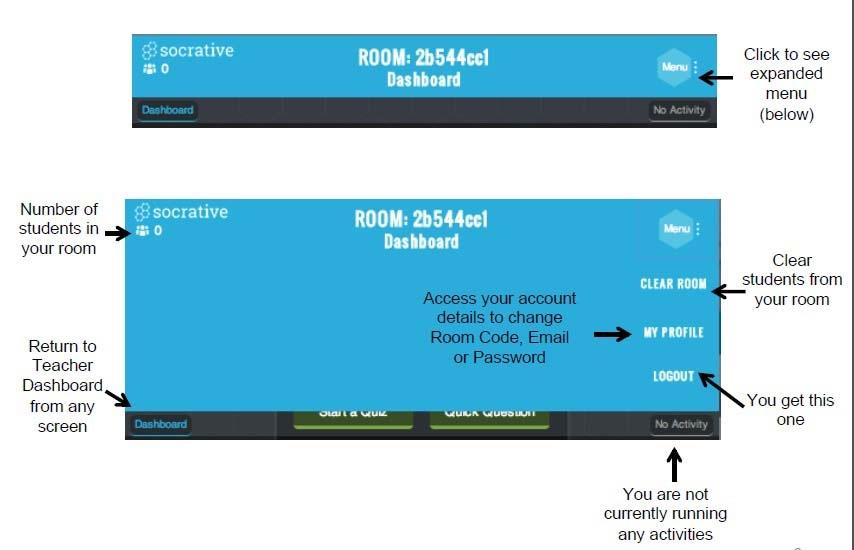
Teachers can login to their device and perform many activities available on their dashboard. On Socrative, teachers can do a lot of activities to engage students.

Dashboard

On the dashboard, you can do various activities such as:

  • Start Quiz
  • Quick Questions
  • Space Race

More Dashboard

Manage Quiz

Quizzes are the best means to judge student’s knowledge and with Socrative, teachers can easily judge their students’ understanding and knowledge of a particular lesson. 

Assessment

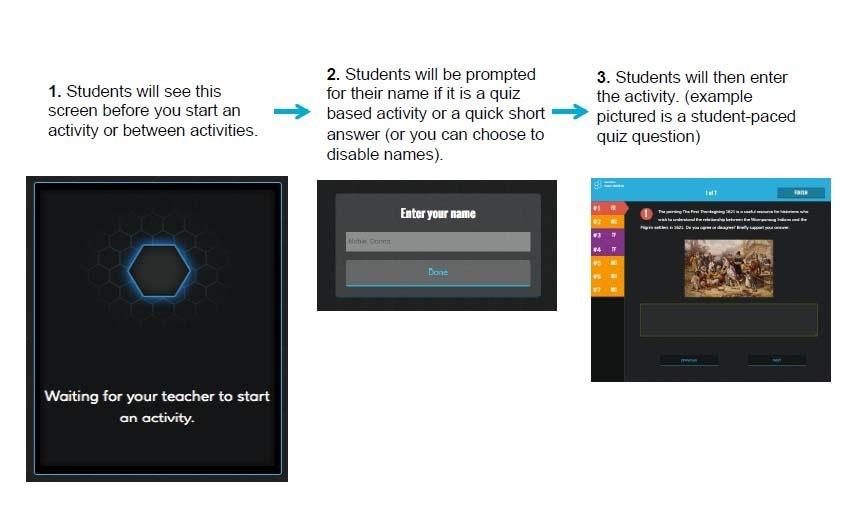
Student’s replies are visually presented. For any pre-planned activity, educators can see reports online. When a teacher performs any activity what students see is:
Why Socrative is Preferred?

  • Quick Feedback: Student results flashes on the teacher’s screen as they respond to the quizzes and questions. Hence, teachers can easily visualize what is happening and what students are doing at the moment.
  • Personalized Content: Here educators can edit and design their own library assessments and can also share it with their personal learning network.
  • Reports: Students understanding can be reviewed in different types of format. Reports can be emailed or can be downloaded or can be saved into Google drive.
  • Compatibility: This app is available in for iOS apps, all web-browsers, Windows app, Android apps, Chrome Apps, Kindle Apps making it reachable for every educational technology settings.

To know more about its features click here.

TAGGED: 21st Century Teaching, Assessments, Formative Assessment, Teachers/Educators, Tools for Teachers/Educators
Share This Article
Facebook Twitter Whatsapp Whatsapp LinkedIn Reddit Telegram Email Copy Link
Previous Article Enriching Tomorrow eLearning Africa 2015 Returns to Ethiopia Enriching Tomorrow: eLearning Africa 2015 Returns to Ethiopia
Next Article How Edmodo Is Turning Students Proactive How Edmodo Is Turning Students Proactive
AdvertisementWhy this Ad?

Latest EdTech News To Your Inbox

Stay Connected

AdvertisementWhy this Ad?

Latest EdTech News To Your Inbox

Stay Connected

AdvertisementWhy this Ad?

You Might Also Like

Supreme Court on Childrens Internet Access What Schools Must Do
Insight

Supreme Court on Children’s Internet Access: What Schools Must Do

Nov 4, 2026
CBSEs AI and Computational Thinking Curriculum for Classes 38 Explained
Insight

CBSE’s AI and Computational Thinking Curriculum for Classes 3–8, Explained

Nov 4, 2026
Why Indian Schools Need Better Coordination Between Administration and Learning
Insight

Why Indian Schools Need Better Coordination Between Administration and Learning

Oct 31, 2026
P2P Bitcoin in India and why learning needs to come before trading
Insight

P2P Bitcoin in India, and why learning needs to come before trading

Oct 29, 2026
Teacher sits at a desk with a laptop and papers surrounded by floating icons about teachers time use
Data & Statistics

What teachers really spend their time on? Discover Study of 1,036 Teachers Found

Oct 21, 2026
Why AI Role Play Should Teach Students to Question Not Just Answer
Practices

Why AI Role Play Should Teach Students to Question, Not Just Answer

Oct 16, 2026
Yasmin Sarwar on the Teenage Body Clock and Why Sleep Belongs on the Revision Timetable
Insight

Yasmin Sarwar on the Teenage Body Clock and Why Sleep Belongs on the Revision Timetable

Oct 15, 2026
How to Find the Greatest Common Factor GCF Steps and Examples
eLearning

How to Find the Greatest Common Factor (GCF): Steps and Examples

Sponsored by
Show More
EdTechReviewEdTechReview

H433, 2nd Floor, Vikaspuri, New Delhi, India, 110018
Phone: 011 41321030

Follow US

Copyright © EdTechReview. All Rights Reserved.

  • Home
  • Advertise
  • Event Associations
  • Press Release
  • About
  • Services
  • Contribute
  • News
  • Trend & Insight
  • Data & Statistics
  • eLearning
  • Reviews
  • Research
  • EdTech Voices
  • Dictionary
  • Tags
  • Resources
  • Events
  • Courses
  • EdTech Product for Review
  • Sponsored/Paid Post Service
  • Our Clients
  • FAQ’S
  • Contact Us
  • Important Links
  • Sitemap
  • Terms of Use
  • Privacy Policy
newsletter
Join 100K+ subscribers!

Subscribe to our weekly newsletter that brings the latest EdTech news, trends, insights, reports, interviews, etc. for educators, school leaders, entrepreneurs, investors, & others.

loader
Zero spam, Unsubscribe at any time.
Welcome Back!

Sign in to your account

Lost your password?