
This website stores cookies on your computer. These cookies are used to improve your website experience and provide more personalized services to you, both on this website and through other media.
Accept
EdTechReviewEdTechReview
  • News
  • Trends
  • Insight
  • eLearning
  • Research
  • Dictionary
  • EdTech Voices
  • More
    • Data & Statistics
    • Reviews
    • AWS for Education
    • Events

    Resources

    • Infographics
    • Reports & Case Studies
    • Videos
    • Books
    • Webinar

    Needs

    • 1:1 Learning
    • 21st Century Education
    • 21st Century Leadership
    • 21st Century Learning
    • 21st Century Teaching
    • 3D Printing
    • More Tags

    For

    • Students
    • Teachers/Educators
    • Administrators
    • Entrepreneurs/Startups
    • Govt. Officials/Policymakers
    • Parents
Explore
Search
Contribute
  • Submit A Post
  • EdTech Trainers and Consultants
  • Your Campus EdTech
  • Your EdTech Product
  • Your Feedback
  • Your Love for Us
  • EdTech Product Reviews
ETR Resources
  • About
  • Mission/Vision
  • Team
  • Services
  • Testimonials
  • Authors
  • Sponsor
  • Partner
  • Advertise
  • Our Clients
  • Media Kit
  • Press Release
  • FAQ’S
Reading: Convert Windows Into An Educational And Safe Playground For Kids Using Magic Desktop 9.1
Aa
EdTechReviewEdTechReview
Aa
Search
  • News
  • Trends
  • Insight
  • eLearning
  • Reviews
  • Dictionary
  • EdTech Voices
  • Data & Statistics
  • Research
  • AWS for Education
  • Events
  • EdTech Voices
  • Tags
  • About
  • FAQ’S
  • Our Clients
  • Partner
Follow US
Home > News > Convert Windows Into An Educational And Safe Playground For Kids Using Magic Desktop 9.1
News

Convert Windows Into An Educational And Safe Playground For Kids Using Magic Desktop 9.1

Editorial Team Published Mar 22, 2016
Share
3 Min Read
Magic Desktop 91 Converts Windows Into An Educational And Safe Playground For Kids
Magic Desktop 9.1 Converts Windows Into An Educational And Safe Playground For Kids
SHARE

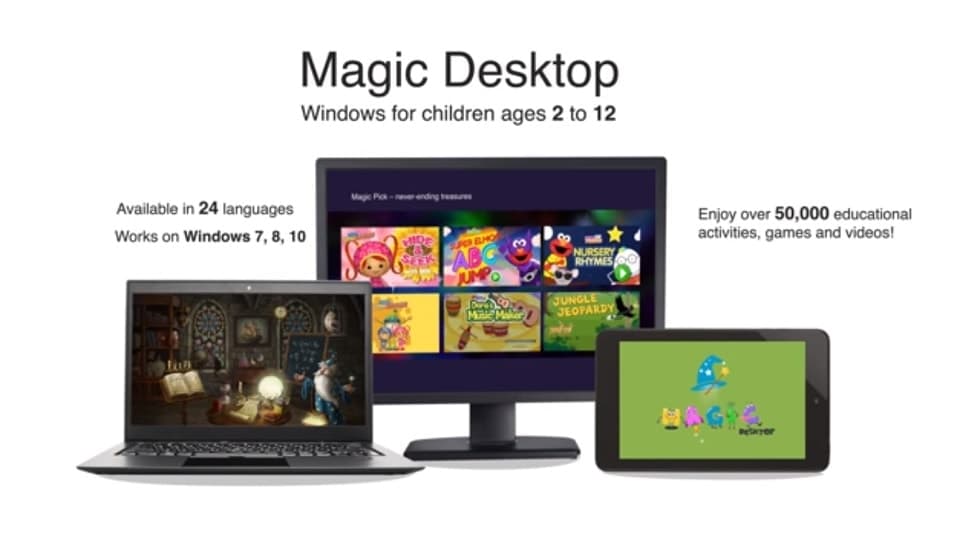
Magic Desktop 9.1 is an educational platform for kids aged 2 to 10 which provides more than 50,000 interactive activities, games and videos carefully    developed and selected for the youngest audience.

AdvertisementWhy this Ad?

Magic Desktop for kids converts operating system Windows 7 & 8 into a magic world full of interesting applications, creates a safe and stimulating environment where kids can improve their computer literacy at their own pace.

The intelligent content selection  allows  one  not to get lost in the vast amount of information and provides users with different activities according to their age and personal preferences. Children can learn numbers, letters, colors and shapes, develop their cognitive abilities such as memory, imagination or attention. The educational games combine education with play and offer hours of entertainment. With the help of the funny giraffe Ge kids will learn basic concepts of arithmetic, mathematics, reading, geography, etc. Applications like Rainbow, Easy Paint or Talking Parrot will boost children’s creativity and language development.

The application is available in more than 20 languages that makes it a perfect fit for multilingual families as well as for the parents who would like their children to speak one or more foreign languages.

Parental control allows to adjust the important features to parents’ or teachers’ needs: choose the number of hours which a kid will spend online, select the day of the week when the use of computer is not allowed, set own rules and award accomplishments with No Homework No Play option. All parental features are password protected and children cannot leave this safe environment on their own.

A safe browser lets parents search and approve appropriate websites and a secure e-mail client Magic Mail hides spam and phishing messages while allowing parental supervision of new contacts. In this way, children can enjoy the advantages of safe internet and parents can be sure that their child never starts conversations with a stranger.

Magic Desktop 9.1 is a powerful tool which encourages learning, protects children online and offers lots of educational content personalized for each user. In 2015 various schools worldwide have installed the software in their computer labs, furthermore, Magic Desktop for kids has been used more recently by homeschooling parents as a supplement to the traditional methods of education.

Videos:

Magic Desktop for free download is available here: www.magicdesktop.com/get

TAGGED: 21st Century Teaching, Parents, Students, Teachers/Educators, Technology in Classroom, Technology in Education, Tips for Parents, Tips for Students, Tips for Teachers/Educators, Tools for Parents, Tools for Students, Tools for Teachers/Educators
Share This Article
Facebook Twitter Whatsapp Whatsapp LinkedIn Reddit Telegram Email Copy Link
By Editorial Team
Follow:
EdTechReview (ETR) is a premier media platform and community for educational stakeholders to connect and find useful news, information and resources on educational technology having a niche subscriber base of 120K+ and an annual readership of 3M+ from over 220 countries and territories across the globe.
Previous Article Convert Windows Into An Educational And Safe Playground For Kids Using Magic Desktop 9.1
Next Article Key Reasons to Growth of Online Test Prep Market Key Reasons to Growth of Online Test Prep Market
AdvertisementWhy this Ad?

Latest EdTech News To Your Inbox

Stay Connected

AdvertisementWhy this Ad?

Latest EdTech News To Your Inbox

Stay Connected

AdvertisementWhy this Ad?

You Might Also Like

10 Best Online Education Masters Programs to Advance Your Teaching Career
eLearning

10 Best Online Education Master’s Programs to Advance Your Teaching Career

Apr 16, 2026
Prep Edu - British Councils top 3 partners in East Asia
News

Prep Edu – British Council’s Top 3 Partners in East Asia

Apr 14, 2026
K-12 EdTech Startup Qweebi Raises $500k To Bring Hands-On STEM & Robotics To Millions Of Students
News

K-12 EdTech Startup Qweebi Raises $500k To Bring Hands-On STEM & Robotics To Millions Of Students

Mar 29, 2026
SchoolStatus Launches Literacy Solution to Help Districts Engage Families in Improving Reading Outcomes
News

SchoolStatus Launches Literacy Solution to Help Districts Engage Families in Improving Reading Outcomes

Mar 12, 2026
How One Canadian Startup Is Reinventing Language Learning with AI
News

How One Canadian Startup Is Reinventing Language Learning with AI

Mar 12, 2026
Why AI Grading Tools Are Changing the Game for K-12 Teachers
Reviews

Why AI Grading Tools Are Changing the Game for K-12 Teachers

Mar 11, 2026
How AI Transcript Evaluation Automates GPA Re-Calculations and Curriculum Matching
News

How AI Transcript Evaluation Automates GPA Re-calculations and Curriculum Matching

Feb 27, 2026
Emversity Raises Series A Funding
News

Emversity Raises $30 Million (₹271 Crore) in Series A funding

Jan 17, 2026
Show More
EdTechReviewEdTechReview

H433, 2nd Floor, Vikaspuri, New Delhi, India, 110018
Phone: 011 41321030

Follow US

Copyright © EdTechReview. All Rights Reserved.

  • Home
  • Advertise
  • Event Associations
  • Press Release
  • About
  • Services
  • Contribute
  • News
  • Trend & Insight
  • Data & Statistics
  • eLearning
  • Reviews
  • Research
  • EdTech Voices
  • Dictionary
  • Tags
  • Resources
  • Events
  • Courses
  • EdTech Product for Review
  • Sponsored/Paid Post Service
  • Our Clients
  • FAQ’S
  • Contact Us
  • Important Links
  • Sitemap
  • Terms of Use
  • Privacy Policy
newsletter
Join 100K+ subscribers!

Subscribe to our weekly newsletter that brings the latest EdTech news, trends, insights, reports, interviews, etc. for educators, school leaders, entrepreneurs, investors, & others.

loader
Zero spam, Unsubscribe at any time.
Go to mobile version
Welcome Back!

Sign in to your account

Lost your password?