This website stores cookies on your computer. These cookies are used to improve your website experience and provide more personalized services to you, both on this website and through other media.
Accept
EdTechReviewEdTechReview
  • News
  • Trends
  • Insight
  • eLearning
  • Research
  • Dictionary
  • EdTech Voices
  • More
    • Data & Statistics
    • Reviews
    • AWS for Education
    • Events

    Resources

    • Infographics
    • Reports & Case Studies
    • Videos
    • Books
    • Webinar

    Needs

    • 1:1 Learning
    • 21st Century Education
    • 21st Century Leadership
    • 21st Century Learning
    • 21st Century Teaching
    • 3D Printing
    • More Tags

    For

    • Students
    • Teachers/Educators
    • Administrators
    • Entrepreneurs/Startups
    • Govt. Officials/Policymakers
    • Parents
Explore
Search
Contribute
  • Submit A Post
  • EdTech Trainers and Consultants
  • Your Campus EdTech
  • Your EdTech Product
  • Your Feedback
  • Your Love for Us
  • EdTech Product Reviews
ETR Resources
  • About
  • Mission/Vision
  • Team
  • Services
  • Testimonials
  • Authors
  • Sponsor
  • Partner
  • Advertise
  • Our Clients
  • Media Kit
  • Press Release
  • FAQ’S
Reading: How TED-ED Site Turns YouTube Videos To ‘Flipped’ Lessons
Aa
EdTechReviewEdTechReview
Aa
Search
  • News
  • Trends
  • Insight
  • eLearning
  • Reviews
  • Dictionary
  • EdTech Voices
  • Data & Statistics
  • Research
  • AWS for Education
  • Events
  • EdTech Voices
  • Tags
  • About
  • FAQ’S
  • Our Clients
  • Partner
Follow US
Home > News > How TED-ED Site Turns YouTube Videos To ‘Flipped’ Lessons
News

How TED-ED Site Turns YouTube Videos To ‘Flipped’ Lessons

Sudhir
Sudhir Published Mar 12, 2013
Share
7 Min Read
How TED-ED Site Turns YouTube Videos To Flipped Lessons
How TED-ED Site Turns YouTube Videos To ‘Flipped’ Lessons
SHARE

TED talks have been the most viewed talk show ever in online portals.  And this talk show of sharing ideas has reached greater heights by continuous development. The growth and scope of flipped classrooms have prompted me to write a review on its current 

AdvertisementWhy this Ad?

best practice. Today, we review how a Youtube video can be converted into a flipped lesson. Flipped lesson in general, is an approach of producing interactive session for students to watch videos and perform assessment as well. But it does not limit with this, flipped classes have numerous features helping students to trace their performance and do many more.

YouTube holds a rich trove of videos that could be used in the classroom, but it’s challenging to transform videos into a truly interactive part of a lesson. So the non-profit group TED has unveiled a new Web site that it hopes will solve this problem—by organizing educational videos and letting professors “flip” them to enhance their lectures.

The new Web site, unveiled today, lets professors turn TED’s educational videos—as well as any video on YouTube—into interactive lessons inspired by the “flipped” classroom model . The site’s introduction is the second phase of an education-focused effort called TED-Ed , which began few months ago when the group released a series of highly produced, animated videos on a new YouTube channel.

Introduction on TED-Ed:

The TED-Ed site is both a portal for finding education videos and a tool for flipping them. On one page, videos are organized by themes, such as the pursuit of happiness and inventions that shaped history. Instructors who want to use videos that are directly related to the subjects they teach can visit another page, where videos are organized in more traditional categories such as the arts and health.

TED’s videos are displayed on lesson pages that include multiple-choice quizzes, open-ended questions, and links to more information about the material. Professors who don’t want to rely on the premade content can press a button to flip the videos and customize some of the questions. With each flipped video, professors receive a unique Web link that they can use to distribute the lesson to students and track their answers.

And instructors don’t have to rely only on TED’s educational videos to make their lessons. A special tool can flip any video on YouTube, adding sections to a lesson page where professors can write free-form questions and create links to other resources.

Logan Smalley, TED-Ed’s director, noted that this feature is truly open—instructors could flip viral videos of cats if they wanted to, he said. He said his group wanted to leave the possibilities of flipped videos up to the people building the lessons.

“We didn’t want to limit what people might want to use to teach,” he said. He added that designers provide a way for users to flag any published lesson that they feel is inappropriate.

Michael S. Garver, a professor of marketing at Central Michigan University, has been testing the site and called it a tool to improve teaching that will bring more voices into the classroom. For the last seven years, Mr. Garver has been making his own videos, and he said the site will allow professors to turn videos created by experts into fresh lessons for class discussions.

Watching Youtube Videos:

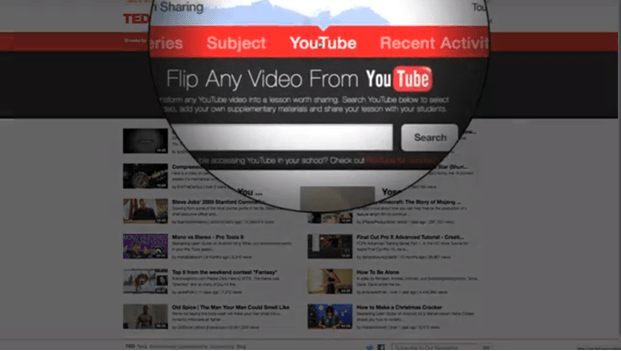
  • First and foremost, go on and visit the TED-ed website.
  • At the Header section, you can find a tab named “Youtube”, just click on it
  • After you click, you will be prompted to the Youtube website’s TED page, where you can search for any video you want.
  • See Image 1 in the slideshow above.


Flipping the Video:

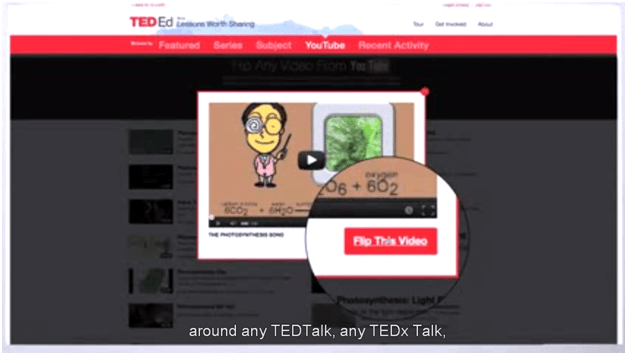
  • Now to create a Flipped Lesson, click on the “flip this video”
  • You will be provided this option on every video you watch on this page.
  • See Image 2 in the slideshow above.


ted youtube videos to flipped lessons 2
Flipping the Video

Create a Lesson:

  • Now to create a task, select “create a lesson”.
  • It allows you to modify everything from top to bottom to create a flip class.
  • See Image 3 in the slideshow above.


ted youtube videos to flipped lessons 3
Creating a Lesson

Adding the Lesson Information:

  • Now it’s time to take charge and completely edit the slides, titles and other necessary data’s accordingly.
  • See Image 4 in the slideshow above.


ted youtube videos to flipped lessons 4
Adding the Lesson Information

Creating Assessment quiz :

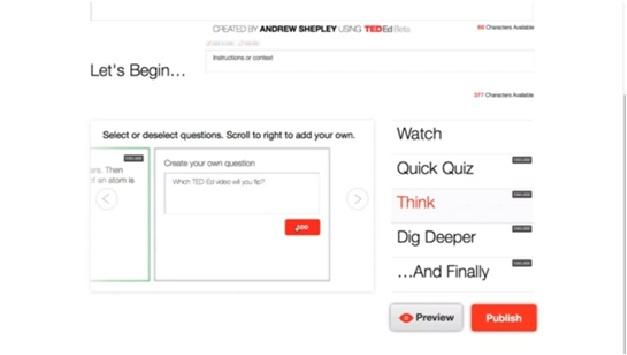
  • The option “Quick quiz” provides to create our own questions with answers and options.
  • See Image 5 in the slideshow above.


ted youtube videos to flipped lessons 5
Creating Assessment Quiz

“Think” & “Dig Deeper”:

  • The further option of “Think” is used to create a questionnaire and answers shall be given out in sentences.
  • “Dig Deeper” is provided for educator to give out few links, so that students could learn more about it , if interested.
  • See Image 6 in the slideshow above.


ted youtube videos to flipped lessons 6
Think and Dig Deeper

Publish it :

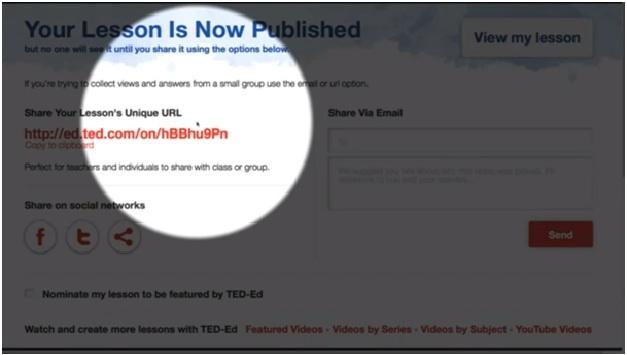
  • Now when everything is done, publish it to world, so many could benefit from your interactive piece of work.
  • After publishing, you will be provided a unique web address or URL, so that any one can access your flip class through this link.
  • And also it could be mailed out to your students concurrently.
  • And you’re done.
  • See Image 7 in the slideshow above.


ted youtube videos to flipped lessons 7

TAGGED: Flipped Classroom, Insights, Online Courses, Teachers/Educators, Tips for Teachers/Educators, Tools for Teachers/Educators, Tools in Education
Share This Article
Facebook Twitter Whatsapp Whatsapp LinkedIn Reddit Telegram Email Copy Link
Previous Article Presentationio - Sync Presentations Presentation.io – Sync Presentations
Next Article student data for edtech companies Why Student Data Is So Essential To EdTech Companies?
AdvertisementWhy this Ad?

Latest EdTech News To Your Inbox

Stay Connected

AdvertisementWhy this Ad?

Latest EdTech News To Your Inbox

Stay Connected

AdvertisementWhy this Ad?

You Might Also Like

Best online career counselling in India  CCO counselling session with student and parents
News

Best Online Career Counselling in India 2026: Why Career Counselling Online Is the No.1 Choice for Students and Parents

Aug 21, 2026
Common Challenges Schools Face When Moving to Digital Assessments
Insight

Common Challenges Schools Face When Moving to Digital Assessments

Jul 14, 2026
upEducators Top Choice for Becoming a Nursery Teacher in India
News

Why is upEducators the Top Choice for Nursery Teacher Training (NTT) Course in India?

Jul 7, 2026
Stop Teaching Students More Apps Teach Them How to Handle Files
eLearning

Stop Teaching Students More Apps, Teach Them How to Handle Files

Jul 3, 2026
Indian EdTech Has Been Solving the Problem It Can Bill For Not the One Children Have
Insight

Indian EdTech Has Been Solving the Problem It Can Bill For, Not The One Children Have

Jul 2, 2026
The Most Important Variable in Education Isnt AI
Insight

The Most Important Variable in Education Isn’t AI – What Building Live Instruction at Scale Actually Taught Me

Jun 26, 2026
Top 7 AI Leadership & Business Administration Programs for Executives in 2026
eLearning

Top 7 AI Leadership & Business Administration Programs for Executives in 2026

Jun 25, 2026
How EdTech Platforms Are Empowering Students with Flexible Learning Opportunities
Insight

How EdTech Platforms Are Empowering Students with Flexible Learning Opportunities

Jun 22, 2026
Show More
EdTechReviewEdTechReview

H433, 2nd Floor, Vikaspuri, New Delhi, India, 110018
Phone: 011 41321030

Follow US

Copyright © EdTechReview. All Rights Reserved.

  • Home
  • Advertise
  • Event Associations
  • Press Release
  • About
  • Services
  • Contribute
  • News
  • Trend & Insight
  • Data & Statistics
  • eLearning
  • Reviews
  • Research
  • EdTech Voices
  • Dictionary
  • Tags
  • Resources
  • Events
  • Courses
  • EdTech Product for Review
  • Sponsored/Paid Post Service
  • Our Clients
  • FAQ’S
  • Contact Us
  • Important Links
  • Sitemap
  • Terms of Use
  • Privacy Policy
newsletter
Join 100K+ subscribers!

Subscribe to our weekly newsletter that brings the latest EdTech news, trends, insights, reports, interviews, etc. for educators, school leaders, entrepreneurs, investors, & others.

loader
Zero spam, Unsubscribe at any time.
Go to mobile version
Welcome Back!

Sign in to your account

Lost your password?