
This website stores cookies on your computer. These cookies are used to improve your website experience and provide more personalized services to you, both on this website and through other media.
Accept
EdTechReviewEdTechReview
  • News
  • Trends
  • Insight
  • eLearning
  • Research
  • Dictionary
  • EdTech Voices
  • More
    • Data & Statistics
    • Reviews
    • AWS for Education
    • Events

    Resources

    • Infographics
    • Reports & Case Studies
    • Videos
    • Books
    • Webinar

    Needs

    • 1:1 Learning
    • 21st Century Education
    • 21st Century Leadership
    • 21st Century Learning
    • 21st Century Teaching
    • 3D Printing
    • More Tags

    For

    • Students
    • Teachers/Educators
    • Administrators
    • Entrepreneurs/Startups
    • Govt. Officials/Policymakers
    • Parents
Explore
Search
Contribute
  • Submit A Post
  • EdTech Trainers and Consultants
  • Your Campus EdTech
  • Your EdTech Product
  • Your Feedback
  • Your Love for Us
  • EdTech Product Reviews
ETR Resources
  • About
  • Mission/Vision
  • Team
  • Services
  • Testimonials
  • Authors
  • Sponsor
  • Partner
  • Advertise
  • Our Clients
  • Media Kit
  • Press Release
  • FAQ’S
Reading: [For Educators] Create Your Own Comic Book & Storyboards with Pixton Comics
Aa
EdTechReviewEdTechReview
Aa
Search
  • News
  • Trends
  • Insight
  • eLearning
  • Reviews
  • Dictionary
  • EdTech Voices
  • Data & Statistics
  • Research
  • AWS for Education
  • Events
  • EdTech Voices
  • Tags
  • About
  • FAQ’S
  • Our Clients
  • Partner
Follow US
Home > Reviews > [For Educators] Create Your Own Comic Book & Storyboards with Pixton Comics
Reviews

[For Educators] Create Your Own Comic Book & Storyboards with Pixton Comics

Priyanka Gupta
Priyanka Gupta Published Oct 7, 2016
Share
4 Min Read
For Educators Create Your Own Comic Book with Pixton Comics
[For Educators] Create Your Own Comic Book with Pixton Comics
SHARE

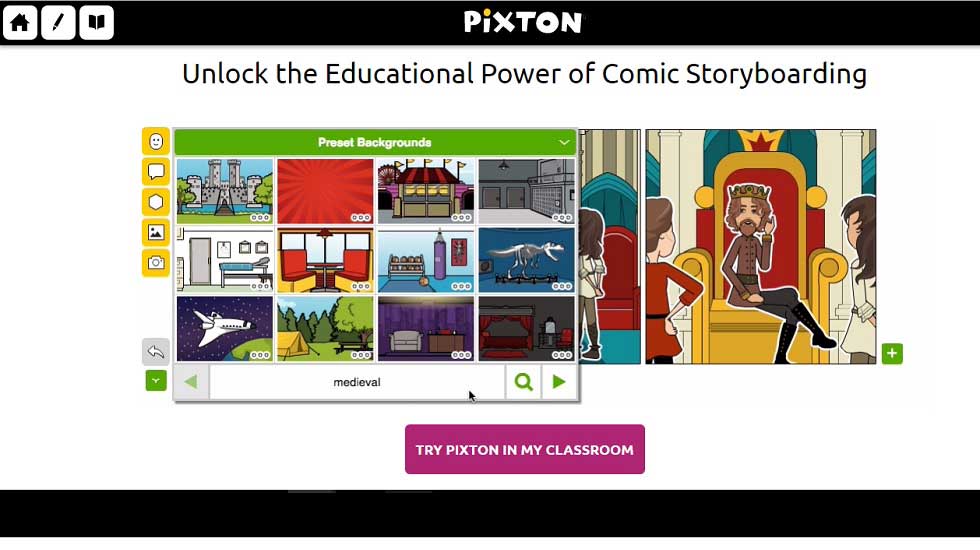
Pixton is an easy to use comic storyboarding software for schools and educators.

AdvertisementWhy this Ad?

It is a do-it-yourself site where kids can use an incredible palette of tools to create and share original comics.

Pain Points/Needs:

Common Core Standards; Digital Storybooks; Digital Storytelling Creators; Language Learning; Lesson Plans; Printable Materials; Student Assessments

Platform:

iOS, Android, Web, Desktop

Walkthrough:

After registering as a user and filling the details of the institution the platform takes time to verify the details. Once the details are verified you are good to go with the platform. In the Tech Administrator mode, you have the options to integrate Google apps, LMS single sign-on and CVS Upload/Direct Input. From there itself you have the other option is to switch to Teacher/Administrator mode by creating a Group. Name the group, select the grade and the subject and you are good to go. The platform is available for K-12 and higher education. Also, those looking for creating special storyboards for languages, special education or other areas can use the platform. After filling all the requirements you can proceed with creating your activities.

To create activities, you can easily import lesson plans from any curated library of subject-specific activities or start from the scratch. The available material from the library is a must check. The library features many topics under the chosen subject. Also, every topic has a step guided teachers’ guide. You simply have to choose an activity and import it from the library. Make changes to the activity as you wish to. Add title, due date, instructions or an added comic for students to have a clue. Save changes and view your activity. In this preview mode you can make sure if you want any further changes. Educators can also print or download the activity.

To assign that activity to your students you simply have to share the activity code with students and direct them to the link of the activity page. When students open that link they have to mention the activity code along with their real name and username. From there students can easily create a comic by opting for a layout from various options available. The site shows many layouts including comic strip, storyboard graphic novel and more.

While creating the comic students can add text, character, prop, background, image and make it just the way they want. Add comments to make points to the teacher and submit it from there only.   

Pricing:

30 Day free trial with per student pricing starting at 30 cents per student a month USD with discounts for larger classrooms.

Usability:

Pixton helps children write. Comics are far more engaging than something like an essay. Combining pictures helps aid understanding particularly for things like language training and ESL/ELL classes.

Our Review:

In our opinion the tool is a good way to engage students in the learning experience. Also it provides ease for educators by covering wide topics and having a library from where teachers can directly pick the activities. Comic-building tools are unbelievably easy to use and simple click-and-drag actions let users create and customize all parts of their comic. Users can even upload photos to their comic or just pop through to Flickr commons and borrow one there.

Pixton’s multiple awards (Webby, People’s Choice, Digital Media to name a few) are well-earned and well-deserved. 
TAGGED: Digital Storytelling, Free Apps and Tools, Teachers/Educators, Tools for Administrators, Tools for Teachers/Educators, Tools in Education
Share This Article
Facebook Twitter Whatsapp Whatsapp LinkedIn Reddit Telegram Email Copy Link
Priyanka Gupta
By Priyanka Gupta
Follow:
Priyanka is an experienced edtech blogger with a passion for improving education through technology. She writes thought-provoking and informative articles on the latest trends and developments in the edtech space. Through her engaging writing style and insightful analysis, readers gain a deeper understanding of how technology is transforming the way we learn and teach. From AI-powered learning platforms to gamification and conventional teaching strategies in the 21st century, Priyanka covers a wide range of topics that are relevant to educators, students, and anyone interested in the future of education.
Previous Article Motivis Learning Launches New Student Information System SIS in Partnership with Hult International Business School Motivis Learning Launches New Student Information System (SIS) in Partnership with Hult International Business School
Next Article Role School Leaders Play in Technology Integration Roles & Responsibilities of a School Leader in Technology Integration
AdvertisementWhy this Ad?

Latest EdTech News To Your Inbox

Stay Connected

AdvertisementWhy this Ad?

Latest EdTech News To Your Inbox

Stay Connected

AdvertisementWhy this Ad?

You Might Also Like

Common Challenges Schools Face When Moving to Digital Assessments
Insight

Common Challenges Schools Face When Moving to Digital Assessments

Jul 14, 2026
upEducators Top Choice for Becoming a Nursery Teacher in India
News

Why is upEducators the Top Choice for Nursery Teacher Training (NTT) Course in India?

Jul 7, 2026
Stop Teaching Students More Apps Teach Them How to Handle Files
eLearning

Stop Teaching Students More Apps, Teach Them How to Handle Files

Jul 3, 2026
Indian EdTech Has Been Solving the Problem It Can Bill For Not the One Children Have
Insight

Indian EdTech Has Been Solving the Problem It Can Bill For, Not The One Children Have

Jul 2, 2026
The Most Important Variable in Education Isnt AI
Insight

The Most Important Variable in Education Isn’t AI – What Building Live Instruction at Scale Actually Taught Me

Jun 26, 2026
How EdTech Platforms Are Empowering Students with Flexible Learning Opportunities
Insight

How EdTech Platforms Are Empowering Students with Flexible Learning Opportunities

Jun 22, 2026
VR Teacher Training Preparing Educators for Future-Ready Classrooms
Trends

VR Teacher Training: Preparing Educators for Future-Ready Classrooms

Jun 16, 2026
How AI Tools Are Changing the Way We Work Learn and Create
Trends

How AI Tools Are Changing the Way We Work, Learn, and Create

Jun 9, 2026
Show More
EdTechReviewEdTechReview

H433, 2nd Floor, Vikaspuri, New Delhi, India, 110018
Phone: 011 41321030

Follow US

Copyright © EdTechReview. All Rights Reserved.

  • Home
  • Advertise
  • Event Associations
  • Press Release
  • About
  • Services
  • Contribute
  • News
  • Trend & Insight
  • Data & Statistics
  • eLearning
  • Reviews
  • Research
  • EdTech Voices
  • Dictionary
  • Tags
  • Resources
  • Events
  • Courses
  • EdTech Product for Review
  • Sponsored/Paid Post Service
  • Our Clients
  • FAQ’S
  • Contact Us
  • Important Links
  • Sitemap
  • Terms of Use
  • Privacy Policy
newsletter
Join 100K+ subscribers!

Subscribe to our weekly newsletter that brings the latest EdTech news, trends, insights, reports, interviews, etc. for educators, school leaders, entrepreneurs, investors, & others.

loader
Zero spam, Unsubscribe at any time.
Go to mobile version
Welcome Back!

Sign in to your account

Lost your password?