This website stores cookies on your computer. These cookies are used to improve your website experience and provide more personalized services to you, both on this website and through other media.
Accept
EdTechReviewEdTechReview
  • News
  • Trends
  • Insight
  • eLearning
  • Research
  • Dictionary
  • EdTech Voices
  • More
    • Data & Statistics
    • Reviews
    • AWS for Education
    • Events

    Resources

    • Infographics
    • Reports & Case Studies
    • Videos
    • Books
    • Webinar

    Needs

    • 1:1 Learning
    • 21st Century Education
    • 21st Century Leadership
    • 21st Century Learning
    • 21st Century Teaching
    • 3D Printing
    • More Tags

    For

    • Students
    • Teachers/Educators
    • Administrators
    • Entrepreneurs/Startups
    • Govt. Officials/Policymakers
    • Parents
Explore
Search
Contribute
  • Submit A Post
  • EdTech Trainers and Consultants
  • Your Campus EdTech
  • Your EdTech Product
  • Your Feedback
  • Your Love for Us
  • EdTech Product Reviews
ETR Resources
  • About
  • Mission/Vision
  • Team
  • Services
  • Testimonials
  • Authors
  • Sponsor
  • Partner
  • Advertise
  • Our Clients
  • Media Kit
  • Press Release
  • FAQ’S
Reading: Engrade – Online Tool Set (Gradebook, Attendance, Calendar) for Teachers
Aa
EdTechReviewEdTechReview
Aa
Search
  • News
  • Trends
  • Insight
  • eLearning
  • Reviews
  • Dictionary
  • EdTech Voices
  • Data & Statistics
  • Research
  • AWS for Education
  • Events
  • EdTech Voices
  • Tags
  • About
  • FAQ’S
  • Our Clients
  • Partner
Follow US
Home > Reviews > Engrade – Online Tool Set (Gradebook, Attendance, Calendar) for Teachers
Reviews

Engrade – Online Tool Set (Gradebook, Attendance, Calendar) for Teachers

Editorial Team Published Mar 8, 2013
Share
3 Min Read
Engrade - Online Tool Set Gradebook Attendance Calendar for Teachers
Engrade - Online Tool Set (Gradebook, Attendance, Calendar) for Teachers
SHARE
Description: – Engrade is an Online Tool Set for teachers which allows them to manage everything about gradebooks, attendance and calendar from anywhere, with more parents interaction and students analysis.

Pain point/Need: –

AdvertisementWhy this Ad?
  • Online class management
    AdvertisementWhy this Ad?
  • Online Assignment and grade allotment

Platform: – Web, Android Phone

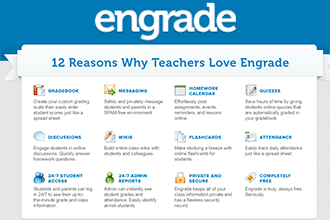
Usability: – Engrade’s offers a very easy registration process and easy to use layout, and the interface is extremely intuitive. Teachers can input their data and the system automatically output grades by adjusting settings as per the specifications. Teachers can use their own custom grading scale, different categories such as tests, quizzes, homework for different students. Teachers can also use an extra credit option for additional activities like assignments. Educator uses a calendar feature where teachers can add dates of tests and quizzes or for any other reminder or task, as well as it offers a feature to set due dates for assignments and students can keep everything organized by using calendar. The grading sheets on the site make it easy to change a grade in the grade book.

Prices: –

  • Free for individual teachers
  • EngradePlus $600/yr for 100 students

Our Review: – Engrade proves to be a smart program that allows teachers to manage multiple classes at once, print grade sheets by class or for an individual student, and even allow teachers to export the sheets into Microsoft Excel. Attendance feature enables the teacher to take attendance on their computer right in the classroom and a “citizenship” tab allows a teacher to comment on a student’s performance. One good feature for students is that they can access study guides for tests, to clear off the problems. Since Engrade is online, educator are able to access their grades from anywhere whenever they have internet access. Teachers can create their lesson interactive by combining YouTube videos, PowerPoint presentations, text, images, and a short practice quiz for students in one easy-to-navigate place. It’s the easiest way to teach and learn online. Engrade is a decent tool for teachers that allows online grading, managing classes and assigning assignment and homework online.

How to use it (Training Videos):-


Contact Us – To know more on how to use

TAGGED: Attendance Management, Free Apps and Tools, Gradebooks, Teachers/Educators, Tools for Teachers/Educators, Tools in Education
Share This Article
Facebook Twitter Whatsapp Whatsapp LinkedIn Reddit Telegram Email Copy Link
By Editorial Team
Follow:
EdTechReview (ETR) is a premier media platform and community for educational stakeholders to connect and find useful news, information and resources on educational technology having a niche subscriber base of 120K+ and an annual readership of 3M+ from over 220 countries and territories across the globe.
Previous Article Webinar Flipped Classroom with Crystal Kirch Webinar: Flipped Classroom with Crystal Kirch
Next Article What Every Teacher Should Practice for Blended Learning What Every Teacher Should Practice for Blended Learning
AdvertisementWhy this Ad?

Latest EdTech News To Your Inbox

Stay Connected

AdvertisementWhy this Ad?

Latest EdTech News To Your Inbox

Stay Connected

AdvertisementWhy this Ad?

You Might Also Like

Why Most School EdTech Rollouts Stall and What Schools Can Do Differently
Practices

Why Most School EdTech Rollouts Stall, and What Schools Can Do Differently

Nov 5, 2026
Why Small Institutes Struggle to Go Digital 6 Lessons for Administrators
Insight

Why Small Institutes Struggle to Go Digital: 6 Lessons for Administrators

Nov 5, 2026
Supreme Court on Childrens Internet Access What Schools Must Do
Insight

Supreme Court on Children’s Internet Access: What Schools Must Do

Nov 4, 2026
Our Pick 5 Learning Apps That Make Learning Feel Like Play
Reviews

Our Pick: 5 Learning Apps That Make Learning Feel Like Play

Oct 29, 2026
Teacher sits at a desk with a laptop and papers surrounded by floating icons about teachers time use
Data & Statistics

What teachers really spend their time on? Discover Study of 1,036 Teachers Found

Oct 21, 2026
Why AI Role Play Should Teach Students to Question Not Just Answer
Practices

Why AI Role Play Should Teach Students to Question, Not Just Answer

Oct 16, 2026
How to Find the Greatest Common Factor GCF Steps and Examples
eLearning

How to Find the Greatest Common Factor (GCF): Steps and Examples

Sponsored by
Top 7 AI for Educators Courses in India 2026-27 Edition
News

Top 7 AI for Educators Courses in India: (2026-27 Edition) Fees, Duration, Mode & Certification Details

Sep 28, 2026
Show More
EdTechReviewEdTechReview

H433, 2nd Floor, Vikaspuri, New Delhi, India, 110018
Phone: 011 41321030

Follow US

Copyright © EdTechReview. All Rights Reserved.

  • Home
  • Advertise
  • Event Associations
  • Press Release
  • About
  • Services
  • Contribute
  • News
  • Trend & Insight
  • Data & Statistics
  • eLearning
  • Reviews
  • Research
  • EdTech Voices
  • Dictionary
  • Tags
  • Resources
  • Events
  • Courses
  • EdTech Product for Review
  • Sponsored/Paid Post Service
  • Our Clients
  • FAQ’S
  • Contact Us
  • Important Links
  • Sitemap
  • Terms of Use
  • Privacy Policy
newsletter
Join 100K+ subscribers!

Subscribe to our weekly newsletter that brings the latest EdTech news, trends, insights, reports, interviews, etc. for educators, school leaders, entrepreneurs, investors, & others.

loader
Zero spam, Unsubscribe at any time.
Welcome Back!

Sign in to your account

Lost your password?