
This website stores cookies on your computer. These cookies are used to improve your website experience and provide more personalized services to you, both on this website and through other media.
Accept
EdTechReviewEdTechReview
  • News
  • Trends
  • Insight
  • eLearning
  • Research
  • Dictionary
  • EdTech Voices
  • More
    • Data & Statistics
    • Reviews
    • AWS for Education
    • Events

    Resources

    • Infographics
    • Reports & Case Studies
    • Videos
    • Books
    • Webinar

    Needs

    • 1:1 Learning
    • 21st Century Education
    • 21st Century Leadership
    • 21st Century Learning
    • 21st Century Teaching
    • 3D Printing
    • More Tags

    For

    • Students
    • Teachers/Educators
    • Administrators
    • Entrepreneurs/Startups
    • Govt. Officials/Policymakers
    • Parents
Explore
Search
Contribute
  • Submit A Post
  • EdTech Trainers and Consultants
  • Your Campus EdTech
  • Your EdTech Product
  • Your Feedback
  • Your Love for Us
  • EdTech Product Reviews
ETR Resources
  • About
  • Mission/Vision
  • Team
  • Services
  • Testimonials
  • Authors
  • Sponsor
  • Partner
  • Advertise
  • Our Clients
  • Media Kit
  • Press Release
  • FAQ’S
Reading: 10 Great Online Resources to Teach Tech to Kindergarten Students
Aa
EdTechReviewEdTechReview
Aa
Search
  • News
  • Trends
  • Insight
  • eLearning
  • Reviews
  • Dictionary
  • EdTech Voices
  • Data & Statistics
  • Research
  • AWS for Education
  • Events
  • EdTech Voices
  • Tags
  • About
  • FAQ’S
  • Our Clients
  • Partner
Follow US
Home > News > 10 Great Online Resources to Teach Tech to Kindergarten Students
News

10 Great Online Resources to Teach Tech to Kindergarten Students

Santosh Bhaskar K
Santosh Bhaskar K Published Jul 25, 2013
Share
6 Min Read
10 Great Online Resources to Teach Tech to Kindergarten Students
SHARE

Nowadays, most of the households have technological devices such as smart phones, tablets, desktop computers and laptops. Kids in the present scenario are more likely to spend their time with technological devices rather than with books and outdoor games.

AdvertisementWhy this Ad?

 We are seeing continuously that innovations in technology enhance learning and it makes classrooms without boundaries .

Kids must be having the knowledge of computers, in order to learn many more things with them in the future. So, it’s your responsibility as a teacher or a parent, to engage your kids with computers at the earliest possible. Here is a list of 10 great online tools you can engage your kindergartners with, on a computer in a right way to explore. These tools will provide you with all the necessary knowledge that is required for accessing a computer and also train you for safe internet usage.

ABCya:

ABCya provides various computer games for kids. Let me tell you about a basic software it provides. Children use different computer devices every day. Some devices are used to input information, while others are to output information from our computers. Computer Input and Output Devices is an interactive software that teaches and tests kids on the input and output devices of a computer. There are many such apps on the website. Make it engaging with your kids and students.

Mouse Skills:

Tidy the Classroom is an interactive web application that will teach your kids about the usage of the mouse. Single click, Double click, Drag and Drop functionalities, etc. are taught interactively with illustrations. Bees & Honey is another similar application that will teach your kids all about the active mouse movements.

Key Board usage:

This tool makes use of an interactive animated video to teach your kids about the usage of mouse and keyboard. It also offers a small test at the end of the video, to assess their learning. Kids can easily learn through the useful tips explained here. They also get to know about the usage of the Space Bar, Enter key and all keyboard letters & numbers.

Computer Parts:

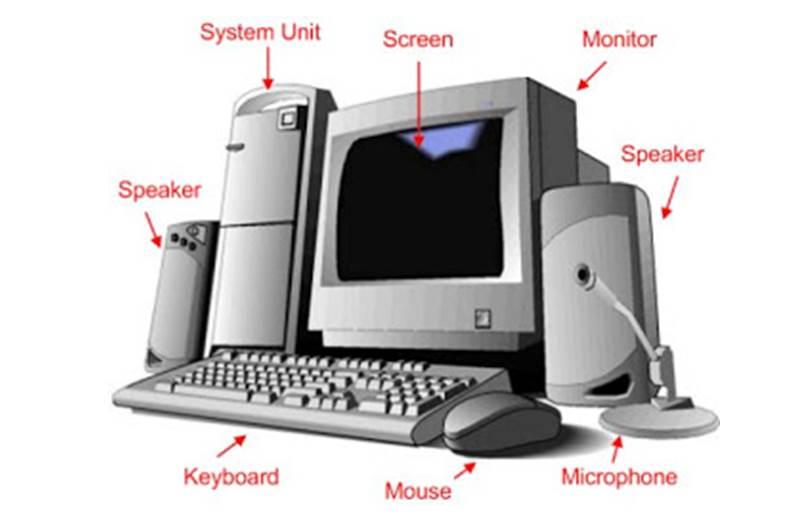
This is an awesome video tool that will teach your kids about various computer parts like keyboard, mouse, monitor, etc. It also explains the usage of those parts and tests your kids to recognize them in an interactive way.

Find the Technology:

Find the Technology is an advanced learning web application for kindergarteners. It is a massive web room full of technology things, and your  task will be to find out the technological devices available in it. You need to click on the thing whose name is displayed on the screen. This can be is a beneficial app for kids.

Organize the Technology:

This interactive web application includes many things like recognizing a technological device, naming it and matching it by dragging the word into the box provided in front of the device. This tool provides multiple benefits for kids.

These are the tools that will provide knowledge about computer parts, usage and practice for your kids.

After getting this basic knowledge, they can explore the web; before that there are some precautions, safety tips and few terminologies they need to know. Let’s learn some tools which will train how to use the internet safely.

Webonauts- Computer Safety Training:

The Webonauts Internet Academy empowers kids to make responsible and respectful decisions in their online interactions. Assuming the role of a Webonaut, kids explore a series of missions that teach key issues of web safety and digital citizenship. Kids will surely love this virtual interactive software and it will let them know everything about computer safety in an interactively engaging way.

Surf Swell Island:

The Surf Swell Island is an interactive web application that will teach your kids about Internet safety in a an interactive question-based manner. While kids play a quiz, it’ll explain them the safety precautions they should take while dealing with online friends. It also explains the symbols and abbreviations used.

CyberQuoll:

Watch the Quoll cousins as they experience the pitfalls and triumphs of being cyber smart on the internet. In six fun cartoon adventures, they give helpful hints and tips for staying cyber safe.

To ensure safe Internet browsing and access to your kids, you can exercise some search and safety preferences to limit or have control of their access on the Internet..

Google Safe search preferences:

Google safe search preferences will provide you the search preferences and priorities. If you turn on the safe search , it will filter the sexually explicit content, which is unsuitable for a certain age group, from your search results. You can also enable voice search options for your searches.

We hope these tools will help you engage your kids with computer and internet usage. Nowadays, technology helps children to become smarter at very young age, so make sure your child is aware of all the technological aspects and is accustomed to their use. Share your personal views in the comment box.

Img src


TAGGED: Elementary Education, Kindergarten, Parents, Teachers/Educators, Technology in Education, Tips for Teachers/Educators, Tools for Parents, Tools for Teachers/Educators
Share This Article
Facebook Twitter Whatsapp Whatsapp LinkedIn Reddit Telegram Email Copy Link
Previous Article Engaging Students by Taking Them on Location with a Green Screen Engaging Students by Taking Them on Location with a Green Screen
Next Article Technology is Helping Students to Adopt Their Own Learning Style Technology is Helping Students to Adopt Their Own Learning Style
AdvertisementWhy this Ad?

Latest EdTech News To Your Inbox

Stay Connected

AdvertisementWhy this Ad?

Latest EdTech News To Your Inbox

Stay Connected

AdvertisementWhy this Ad?

You Might Also Like

Best online career counselling in India  CCO counselling session with student and parents
News

Best Online Career Counselling in India 2026: Why Career Counselling Online Is the No.1 Choice for Students and Parents

Aug 21, 2026
Bringing Interactive Smart Boards to Small-Town and Rural Classrooms in India
Insight

Bringing Interactive Smart Boards to Small-Town and Rural Classrooms in India: A Practical Guide for Better Digital Learning

Aug 6, 2026
How Expat Parents Can Choose the Right International School Before Moving Abroad
Insight

How Expat Parents Can Choose the Right International School Before Moving Abroad

Aug 4, 2026
How AI and Smart Sensors Are Creating Safer Learning Environments
Trends

How AI and Smart Sensors Are Creating Safer Learning Environments

Jul 16, 2026
Common Challenges Schools Face When Moving to Digital Assessments
Insight

Common Challenges Schools Face When Moving to Digital Assessments

Jul 14, 2026
upEducators Top Choice for Becoming a Nursery Teacher in India
News

Why is upEducators the Top Choice for Nursery Teacher Training (NTT) Course in India?

Jul 7, 2026
What Schools Really Pay Without Language Access Systems in Place
Insight

What Schools Really Pay Without Language Access Systems in Place

Jul 4, 2026
Stop Teaching Students More Apps Teach Them How to Handle Files
eLearning

Stop Teaching Students More Apps, Teach Them How to Handle Files

Jul 3, 2026
Show More
EdTechReviewEdTechReview

H433, 2nd Floor, Vikaspuri, New Delhi, India, 110018
Phone: 011 41321030

Follow US

Copyright © EdTechReview. All Rights Reserved.

  • Home
  • Advertise
  • Event Associations
  • Press Release
  • About
  • Services
  • Contribute
  • News
  • Trend & Insight
  • Data & Statistics
  • eLearning
  • Reviews
  • Research
  • EdTech Voices
  • Dictionary
  • Tags
  • Resources
  • Events
  • Courses
  • EdTech Product for Review
  • Sponsored/Paid Post Service
  • Our Clients
  • FAQ’S
  • Contact Us
  • Important Links
  • Sitemap
  • Terms of Use
  • Privacy Policy
newsletter
Join 100K+ subscribers!

Subscribe to our weekly newsletter that brings the latest EdTech news, trends, insights, reports, interviews, etc. for educators, school leaders, entrepreneurs, investors, & others.

loader
Zero spam, Unsubscribe at any time.
Go to mobile version
Welcome Back!

Sign in to your account

Lost your password?