This website stores cookies on your computer. These cookies are used to improve your website experience and provide more personalized services to you, both on this website and through other media.
Accept
EdTechReviewEdTechReview
  • News
  • Trends
  • Insight
  • eLearning
  • Research
  • Dictionary
  • EdTech Voices
  • More
    • Data & Statistics
    • Reviews
    • AWS for Education
    • Events

    Resources

    • Infographics
    • Reports & Case Studies
    • Videos
    • Books
    • Webinar

    Needs

    • 1:1 Learning
    • 21st Century Education
    • 21st Century Leadership
    • 21st Century Learning
    • 21st Century Teaching
    • 3D Printing
    • More Tags

    For

    • Students
    • Teachers/Educators
    • Administrators
    • Entrepreneurs/Startups
    • Govt. Officials/Policymakers
    • Parents
Explore
Search
Contribute
  • Submit A Post
  • EdTech Trainers and Consultants
  • Your Campus EdTech
  • Your EdTech Product
  • Your Feedback
  • Your Love for Us
  • EdTech Product Reviews
ETR Resources
  • About
  • Mission/Vision
  • Team
  • Services
  • Testimonials
  • Authors
  • Sponsor
  • Partner
  • Advertise
  • Our Clients
  • Media Kit
  • Press Release
  • FAQ’S
Reading: Buncee – Create Sharable Multi-Media Content
Aa
EdTechReviewEdTechReview
Aa
Search
  • News
  • Trends
  • Insight
  • eLearning
  • Reviews
  • Dictionary
  • EdTech Voices
  • Data & Statistics
  • Research
  • AWS for Education
  • Events
  • EdTech Voices
  • Tags
  • About
  • FAQ’S
  • Our Clients
  • Partner
Follow US
Home > Reviews > Buncee – Create Sharable Multi-Media Content
Reviews

Buncee – Create Sharable Multi-Media Content

Editorial Team Published Apr 29, 2013
Share
6 Min Read
Buncee - Create Sharable Multi-Media Content
SHARE
 

Description:- Buncee is an online platform to create sharable multi-media content in the form of Slides and Cards on a canvas called Buncee, where users can add content like text, videos, images, links, audio files (Youtube, Instagram, Soundcloud

AdvertisementWhy this Ad?

 & Google), custom shapes and prebuilt messages and media art.

Pain Point/Need:-

  1. Online Multi-Media Content Creation
  2. Slides and Card Creation

Platform:- Web

Usability:- Buncee in an online platform that brings the power of Power Point and somewhat of Photoshop to you in a very neatly built platform and all that for free. Buncee can be used for creating simple single slide cards or for creating a complete multimedia slide show with content like Videos, Text, Links, Images, Audio Files, Custom Shapes and much more. Additionally, the platform allows users to share the created Buncees on the most popular Social Networking platforms like Facebook, Twitter, Pinterest, etc. Also, the users can embed these Buncees into any web platform of their choice.

Using this platform, users; especially teachers can create flashcards, lesson plans, lesson content and more for their students. Also, this helps them to flip their classroom  (Also see: What is Flipped Classroom) as they can create the desired content and distribute it to the students which they can view before coming to class and hence have a better understanding of the topic and eventually participate in other activities in the classroom.

Walk-Through:- As you log in to the site www.buncee.com, you see their landing page that demonstrates how Buncee can be useful to you. The users can take a tour of the site and see sample Buncees created by other users under different categories. Users can create their account either by signing up using their social account or by simply filling up a registration form. Once done, the users are redirected to the home page. From here users can click on the ‘Create your Own’ button and start creating their own Buncees.

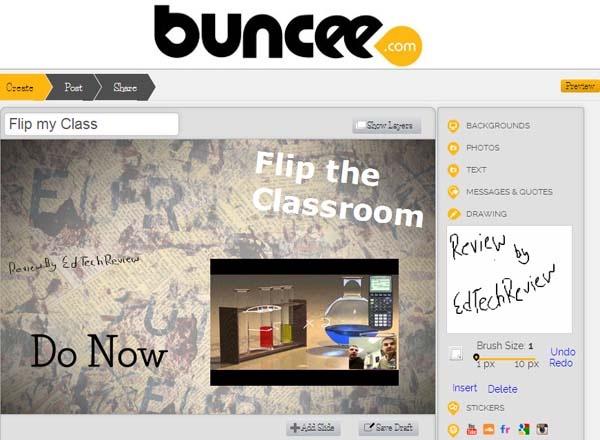
On the raw canvas, users can simply add multimedia content like the text, videos, images, links and more from the right panel which provides easy access to all these elements and makes it easy for the users to work. On the added elements, users can easily perform resizing, relocation and rotation to suit the desired design. The platform also allows users to add custom backgrounds, images and text to make things more customizable. Using the “Add Slide” button, users can add multiple slides to make a complete slide show using Buncee.


Contact Us – To know more


Continued on the next page…
12Next Page
TAGGED: Freemium Apps, Multimedia, Students, Teachers/Educators, Tools for Students, Tools for Teachers/Educators, Tools in Education
Share This Article
Facebook Twitter Whatsapp Whatsapp LinkedIn Reddit Telegram Email Copy Link
By Editorial Team
Follow:
EdTechReview (ETR) is a premier media platform and community for educational stakeholders to connect and find useful news, information and resources on educational technology having a niche subscriber base of 120K+ and an annual readership of 3M+ from over 220 countries and territories across the globe.
Previous Article BabyTV - Kindergarten Resource Library BabyTV – Kindergarten Resource Library
Next Article Report Complete Guide to Flipped Classroom [Report] Complete Guide to Flipped Classroom
AdvertisementWhy this Ad?

Latest EdTech News To Your Inbox

Stay Connected

AdvertisementWhy this Ad?

Latest EdTech News To Your Inbox

Stay Connected

AdvertisementWhy this Ad?

You Might Also Like

Common Challenges Schools Face When Moving to Digital Assessments
Insight

Common Challenges Schools Face When Moving to Digital Assessments

Jul 14, 2026
Whats Actually Costing Students Their Spot at University The Most Common Rejection Reasons in 2026
Insight

What’s Actually Costing Students Their Spot at University. The Most Common Rejection Reasons in 2026

Jul 10, 2026
How Students Can Turn Learning Into a Job-Ready Resume
Insight

How Students Can Turn Learning Into a Job-Ready Resume

Jul 8, 2026
upEducators Top Choice for Becoming a Nursery Teacher in India
News

Why is upEducators the Top Choice for Nursery Teacher Training (NTT) Course in India?

Jul 7, 2026
Stop Teaching Students More Apps Teach Them How to Handle Files
eLearning

Stop Teaching Students More Apps, Teach Them How to Handle Files

Jul 3, 2026
Indian EdTech Has Been Solving the Problem It Can Bill For Not the One Children Have
Insight

Indian EdTech Has Been Solving the Problem It Can Bill For, Not The One Children Have

Jul 2, 2026
The Most Important Variable in Education Isnt AI
Insight

The Most Important Variable in Education Isn’t AI – What Building Live Instruction at Scale Actually Taught Me

Jun 26, 2026
Why AI-Powered Personalized Learning Is Becoming the New Standard in EdTech
Insight

Why AI-Powered Personalized Learning Is Becoming the New Standard in EdTech

Jun 25, 2026
Show More
EdTechReviewEdTechReview

H433, 2nd Floor, Vikaspuri, New Delhi, India, 110018
Phone: 011 41321030

Follow US

Copyright © EdTechReview. All Rights Reserved.

  • Home
  • Advertise
  • Event Associations
  • Press Release
  • About
  • Services
  • Contribute
  • News
  • Trend & Insight
  • Data & Statistics
  • eLearning
  • Reviews
  • Research
  • EdTech Voices
  • Dictionary
  • Tags
  • Resources
  • Events
  • Courses
  • EdTech Product for Review
  • Sponsored/Paid Post Service
  • Our Clients
  • FAQ’S
  • Contact Us
  • Important Links
  • Sitemap
  • Terms of Use
  • Privacy Policy
newsletter
Join 100K+ subscribers!

Subscribe to our weekly newsletter that brings the latest EdTech news, trends, insights, reports, interviews, etc. for educators, school leaders, entrepreneurs, investors, & others.

loader
Zero spam, Unsubscribe at any time.
Go to mobile version
Welcome Back!

Sign in to your account

Lost your password?