
This website stores cookies on your computer. These cookies are used to improve your website experience and provide more personalized services to you, both on this website and through other media.
Accept
EdTechReviewEdTechReview
  • News
  • Trends
  • Insight
  • eLearning
  • Research
  • Dictionary
  • EdTech Voices
  • More
    • Data & Statistics
    • Reviews
    • AWS for Education
    • Events

    Resources

    • Infographics
    • Reports & Case Studies
    • Videos
    • Books
    • Webinar

    Needs

    • 1:1 Learning
    • 21st Century Education
    • 21st Century Leadership
    • 21st Century Learning
    • 21st Century Teaching
    • 3D Printing
    • More Tags

    For

    • Students
    • Teachers/Educators
    • Administrators
    • Entrepreneurs/Startups
    • Govt. Officials/Policymakers
    • Parents
Explore
Search
Contribute
  • Submit A Post
  • EdTech Trainers and Consultants
  • Your Campus EdTech
  • Your EdTech Product
  • Your Feedback
  • Your Love for Us
  • EdTech Product Reviews
ETR Resources
  • About
  • Mission/Vision
  • Team
  • Services
  • Testimonials
  • Authors
  • Sponsor
  • Partner
  • Advertise
  • Our Clients
  • Media Kit
  • Press Release
  • FAQ’S
Reading: Creati.st – Complete Online Active Learning Solution
Aa
EdTechReviewEdTechReview
Aa
Search
  • News
  • Trends
  • Insight
  • eLearning
  • Reviews
  • Dictionary
  • EdTech Voices
  • Data & Statistics
  • Research
  • AWS for Education
  • Events
  • EdTech Voices
  • Tags
  • About
  • FAQ’S
  • Our Clients
  • Partner
Follow US
Home > Reviews > Creati.st – Complete Online Active Learning Solution
Reviews

Creati.st – Complete Online Active Learning Solution

Saomya Saxena
Saomya Saxena Published Jul 27, 2013
Share
10 Min Read
Creatist - Complete Online Active Learning Solution
Creati.st - Complete Online Active Learning Solution
SHARE


AdvertisementWhy this Ad?

Instructor can set the security levels to different settings starting with high priority for coprighted content which can only be viewed when the devices of all students are locked and the environment is secured, followed by ‘Medium’ or ‘Low’ priority levels for less critical data, depending on the level of security of environment or by the type of client (Web, Android, etc.) you want them accessed on. For instance, you can assign Handouts to students to refer to after the class and set their priority as ‘Low’, which can be viewed by students using any type of clients, anytime and anywhere.

Adding content to get ready for the class is Drag-and-Drop away. Once saved; you can ready to ‘Start the Class’. The status button updates you on the students who are logging in through their devices. The logged-in students are instantly taken to class. At this point, a student can’t yet access the content available in the class.

Adding content to get ready for the class is Drag-and-Drop away. Once saved; you can ready to ‘Start the Class’. The status button updates you on the students who are logging in through their devices. The logged-in students are instantly taken to class. At this point, a student can’t yet access the content available in the class.

Now, when all students are online, you can start by asking them if they need to clarify any concepts from the last class, by sending them a ‘Quick Check’, which the students answer and you get their responses in real-time, with the help of which, you can realize, on what topic the majority of your class has issues.

Since students have their own devices in class, they can be easily distracted from class. You can tackle this issue by simply pressing the ‘Lock’ button, which locks the devices of all students, so now they can’t access anything else out of Creati.st. This affirms the environment to be highly secured, and now students can access the content shared in class.

For feedback, you can always conduct polls and the results are shown in real-time. Polling can be very useful and can be employed in a number of ways (Seek you students views and get justifications to support their responses and based on these responses, you can allot class participation points to individual students). You can view the participation of your class using Bar Graphs and Pie Charts.

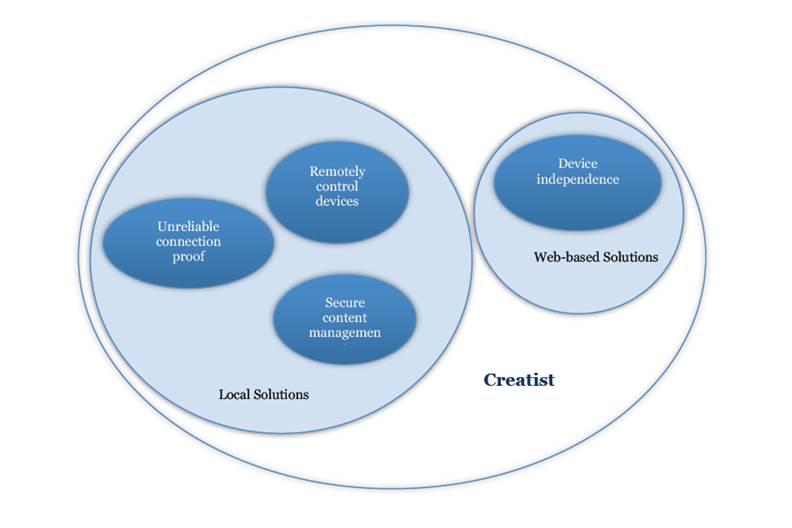
Creati.st addresses the issue of faulty internet connectivity intelligently, detects it and reconnects everyone to their previous state.

The system keeps track of every single activity (like, the content used, students’ attendance reports and results of quick checks/ polls which are saved) in form of an activity log which at the end of the class can be accessed as the Class Summary and archived for future reference.

Prices:-

There will be 3 types of offerings:

  • Creat!st Lite: (Anyone can use Creat!st to convert a class to a smart class)

Model: Freemium (1 month free trial)

Features:

– No setup cost

– $20 per student account

– Online Support and upgrades included


Contact Us – To know more

  Continued on Next Page…

Previous Page123Next Page
TAGGED: Administrators, Blended Learning, Classroom Management, EdTech Startups/Companies, Students, Teachers/Educators, Tools for Administrators, Tools for Teachers/Educators, Tools in Education
Share This Article
Facebook Twitter Whatsapp Whatsapp LinkedIn Reddit Telegram Email Copy Link
Previous Article 5 Tools to Create Classroom Polls & Quizzes 5 Tools to Create Classroom Polls & Quizzes
Next Article Smart Seat - The First iPadiPhone Seating Chart App for Teachers Smart Seat – The First iPad/iPhone Seating Chart App for Teachers
AdvertisementWhy this Ad?

Latest EdTech News To Your Inbox

Stay Connected

AdvertisementWhy this Ad?

Latest EdTech News To Your Inbox

Stay Connected

AdvertisementWhy this Ad?

You Might Also Like

Teacher sits at a desk with a laptop and papers surrounded by floating icons about teachers time use
Data & Statistics

What teachers really spend their time on? Discover Study of 1,036 Teachers Found

Oct 21, 2026
Why AI Role Play Should Teach Students to Question Not Just Answer
Practices

Why AI Role Play Should Teach Students to Question, Not Just Answer

Oct 16, 2026
Yasmin Sarwar on the Teenage Body Clock and Why Sleep Belongs on the Revision Timetable
Insight

Yasmin Sarwar on the Teenage Body Clock and Why Sleep Belongs on the Revision Timetable

Oct 15, 2026
Taz publishes parent guides for exploring science and coding together
News

Taz publishes parent guides for exploring science and coding together

Oct 14, 2026
2U Wins Online Education Solution Provider of the Year as AI Reshapes Digital Learning
News

2U Wins Online Education Solution Provider of the Year as AI Reshapes Digital Learning

Oct 7, 2026
Optimizing Knowledge Retention in Modern Education Through Cognitive AI
eLearning

Optimizing Knowledge Retention in Modern Education Through Cognitive AI

Oct 1, 2026
How to Find the Greatest Common Factor GCF Steps and Examples
eLearning

How to Find the Greatest Common Factor (GCF): Steps and Examples

Sponsored by
Top 7 AI for Educators Courses in India 2026-27 Edition
News

Top 7 AI for Educators Courses in India: (2026-27 Edition) Fees, Duration, Mode & Certification Details

Sep 28, 2026
Show More
EdTechReviewEdTechReview

H433, 2nd Floor, Vikaspuri, New Delhi, India, 110018
Phone: 011 41321030

Follow US

Copyright © EdTechReview. All Rights Reserved.

  • Home
  • Advertise
  • Event Associations
  • Press Release
  • About
  • Services
  • Contribute
  • News
  • Trend & Insight
  • Data & Statistics
  • eLearning
  • Reviews
  • Research
  • EdTech Voices
  • Dictionary
  • Tags
  • Resources
  • Events
  • Courses
  • EdTech Product for Review
  • Sponsored/Paid Post Service
  • Our Clients
  • FAQ’S
  • Contact Us
  • Important Links
  • Sitemap
  • Terms of Use
  • Privacy Policy
newsletter
Join 100K+ subscribers!

Subscribe to our weekly newsletter that brings the latest EdTech news, trends, insights, reports, interviews, etc. for educators, school leaders, entrepreneurs, investors, & others.

loader
Zero spam, Unsubscribe at any time.
Go to mobile version
Welcome Back!

Sign in to your account

Lost your password?