This website stores cookies on your computer. These cookies are used to improve your website experience and provide more personalized services to you, both on this website and through other media.
Accept
EdTechReviewEdTechReview
  • News
  • Trends
  • Insight
  • eLearning
  • Research
  • Dictionary
  • EdTech Voices
  • More
    • Data & Statistics
    • Reviews
    • AWS for Education
    • Events

    Resources

    • Infographics
    • Reports & Case Studies
    • Videos
    • Books
    • Webinar

    Needs

    • 1:1 Learning
    • 21st Century Education
    • 21st Century Leadership
    • 21st Century Learning
    • 21st Century Teaching
    • 3D Printing
    • More Tags

    For

    • Students
    • Teachers/Educators
    • Administrators
    • Entrepreneurs/Startups
    • Govt. Officials/Policymakers
    • Parents
Explore
Search
Contribute
  • Submit A Post
  • EdTech Trainers and Consultants
  • Your Campus EdTech
  • Your EdTech Product
  • Your Feedback
  • Your Love for Us
  • EdTech Product Reviews
ETR Resources
  • About
  • Mission/Vision
  • Team
  • Services
  • Testimonials
  • Authors
  • Sponsor
  • Partner
  • Advertise
  • Our Clients
  • Media Kit
  • Press Release
  • FAQ’S
Reading: iversity.org- Open Online Course Center (MOOC)
Aa
EdTechReviewEdTechReview
Aa
Search
  • News
  • Trends
  • Insight
  • eLearning
  • Reviews
  • Dictionary
  • EdTech Voices
  • Data & Statistics
  • Research
  • AWS for Education
  • Events
  • EdTech Voices
  • Tags
  • About
  • FAQ’S
  • Our Clients
  • Partner
Follow US
Home > Reviews > iversity.org- Open Online Course Center (MOOC)
Reviews

iversity.org- Open Online Course Center (MOOC)

Editorial Team Published May 23, 2013
Share
10 Min Read
iversityorg- Open Online Course Center MOOC
iversity.org- Open Online Course Center (MOOC)
SHARE

Creating a course is very easy and offers a variety of access options starting with the privacy setting that makes the course accessible to public or hidden from them, going up to the advanced Administrative privileges to assign administrators of the group to manage it. Also, these courses can be assigned to multiple groups and the administrator of the course can put a picture for the course. Once the user clicks next, the second step prompts the user to add event to the calendar with respect to the course being created. The users can skip this step if they don’t want to add anything to the calendar. Finally, the system asks the user to invite additional users to attend the course, by simply typing in the names of the users if they have them as their contacts, by entering the email addresses and inviting them to join, by distributing the course code which can be used anytime to join the respective course or by sharing the link to the course.

AdvertisementWhy this Ad?

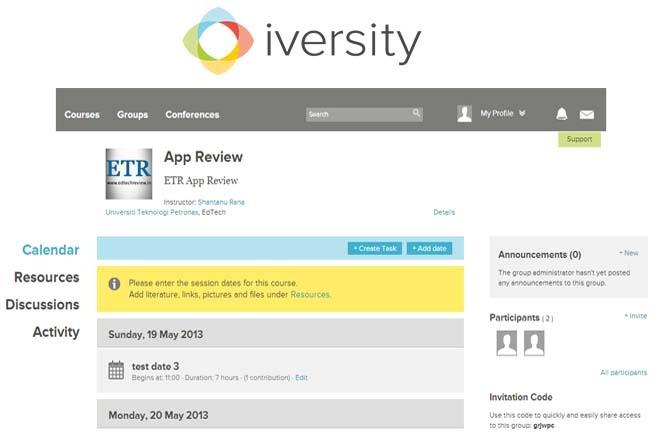
Once done, the user is navigated to the course page where the calendar is the default menu that is loaded and all the activities are streamed to the main activity stream. Here, users get all the details of their courses in a very neatly laid interface. By default, ‘Calendar’ is the selected tab streaming all the activities and tasks based on the dates on which they were created. Using this, the Course administrator can create new tasks and date notices for the members. From the ‘Resources’ menu, the users can create course resources to help people who are attending the course. This resource menu helps users to add content like lectures (where they can upload any kind of file and even attach links to amazon.com for other users to make purchases directly in addition to any downloadable material uploaded). Furthermore, the system also allows the user to add additional content like web links, images, videos (Youtube and Vimeo) and any other content type. All this content is displayed in reverse chronological order in the activity stream on the dashboard, while in the course view, the activities are listed in the chronological order.

Any content added to resources under any course can be linked with any task created for that course in the calendar, and the calendar shows all the activities and the linked resources in a chronological order.

Additionally, every user gets a personal work area where they can create a complete personalized learning resource center using features like courses, conferences, resources, personal file systems and more.

When the tasks are open for users to join, the user can simply click the opt-in button directly from the activity stream. Also, the user can start discussions with the collaborators from the stream itself.

Continued on next page…
Previous Page123Next Page
TAGGED: Freemium Apps, MOOCs, Online Courses, Students, Teachers/Educators, Tools for Students, Tools for Teachers/Educators, Tools in Education
Share This Article
Facebook Twitter Whatsapp Whatsapp LinkedIn Reddit Telegram Email Copy Link
By Editorial Team
Follow:
EdTechReview (ETR) is a premier media platform and community for educational stakeholders to connect and find useful news, information and resources on educational technology having a niche subscriber base of 120K+ and an annual readership of 3M+ from over 220 countries and territories across the globe.
Previous Article Reasons for Slow Adoption of Gamification in Education Reasons for Slow Adoption of Gamification in Education
Next Article developing PLN using social media Developing Your Personal Learning Network (PLN)
AdvertisementWhy this Ad?

Latest EdTech News To Your Inbox

Stay Connected

AdvertisementWhy this Ad?

Latest EdTech News To Your Inbox

Stay Connected

AdvertisementWhy this Ad?

You Might Also Like

Optimizing Knowledge Retention in Modern Education Through Cognitive AI
eLearning

Optimizing Knowledge Retention in Modern Education Through Cognitive AI

Oct 1, 2026
How to Find the Greatest Common Factor GCF Steps and Examples
eLearning

How to Find the Greatest Common Factor (GCF): Steps and Examples

Sponsored by
Top 7 AI for Educators Courses in India 2026-27 Edition
News

Top 7 AI for Educators Courses in India: (2026-27 Edition) Fees, Duration, Mode & Certification Details

Sep 28, 2026
How to Enhance Student Project Videos Shot on Phones
Trends

How to Enhance Student Project Videos Shot on Phones

Sep 28, 2026
A Student Doesnt Need Another Score They Need to Know What to Do Next
Insight

A Student Doesn’t Need Another Score. They Need to Know What to Do Next.

Sep 25, 2026
One-on-One Doesnt Mean Personalized
Practices

One-on-One Doesn’t Mean Personalized

Sep 23, 2026
The Teacher Answers to Everyone
Insight

The Teacher Answers to Everyone

Sep 19, 2026
What is Student Employability
Insight

What is Student Employability?

Sep 18, 2026
Show More
EdTechReviewEdTechReview

H433, 2nd Floor, Vikaspuri, New Delhi, India, 110018
Phone: 011 41321030

Follow US

Copyright © EdTechReview. All Rights Reserved.

  • Home
  • Advertise
  • Event Associations
  • Press Release
  • About
  • Services
  • Contribute
  • News
  • Trend & Insight
  • Data & Statistics
  • eLearning
  • Reviews
  • Research
  • EdTech Voices
  • Dictionary
  • Tags
  • Resources
  • Events
  • Courses
  • EdTech Product for Review
  • Sponsored/Paid Post Service
  • Our Clients
  • FAQ’S
  • Contact Us
  • Important Links
  • Sitemap
  • Terms of Use
  • Privacy Policy
newsletter
Join 100K+ subscribers!

Subscribe to our weekly newsletter that brings the latest EdTech news, trends, insights, reports, interviews, etc. for educators, school leaders, entrepreneurs, investors, & others.

loader
Zero spam, Unsubscribe at any time.
Go to mobile version
Welcome Back!

Sign in to your account

Lost your password?