This website stores cookies on your computer. These cookies are used to improve your website experience and provide more personalized services to you, both on this website and through other media.
Accept
EdTechReviewEdTechReview
  • News
  • Trends
  • Insight
  • eLearning
  • Research
  • Dictionary
  • EdTech Voices
  • More
    • Data & Statistics
    • Reviews
    • AWS for Education
    • Events

    Resources

    • Infographics
    • Reports & Case Studies
    • Videos
    • Books
    • Webinar

    Needs

    • 1:1 Learning
    • 21st Century Education
    • 21st Century Leadership
    • 21st Century Learning
    • 21st Century Teaching
    • 3D Printing
    • More Tags

    For

    • Students
    • Teachers/Educators
    • Administrators
    • Entrepreneurs/Startups
    • Govt. Officials/Policymakers
    • Parents
Explore
Search
Contribute
  • Submit A Post
  • EdTech Trainers and Consultants
  • Your Campus EdTech
  • Your EdTech Product
  • Your Feedback
  • Your Love for Us
  • EdTech Product Reviews
ETR Resources
  • About
  • Mission/Vision
  • Team
  • Services
  • Testimonials
  • Authors
  • Sponsor
  • Partner
  • Advertise
  • Our Clients
  • Media Kit
  • Press Release
  • FAQ’S
Reading: QuizBean – Online Quiz Creator
Aa
EdTechReviewEdTechReview
Aa
Search
  • News
  • Trends
  • Insight
  • eLearning
  • Reviews
  • Dictionary
  • EdTech Voices
  • Data & Statistics
  • Research
  • AWS for Education
  • Events
  • EdTech Voices
  • Tags
  • About
  • FAQ’S
  • Our Clients
  • Partner
Follow US
Home > Reviews > QuizBean – Online Quiz Creator
Reviews

QuizBean – Online Quiz Creator

Saomya Saxena
Saomya Saxena Published Nov 28, 2013
Share
6 Min Read
QuizPoo - Online QuizUseReviewTraining-EdTechReview
QuizPoo - Online Quiz(Use,Review,Training)-EdTechReview
SHARE

Description:– QuizBean (formerly known as QuizPoo) is an online quiz creator for teachers and trainers to help them assess student learning. You can add unlimited questions, explanations and pictures to each question and share your quiz over social media, 

AdvertisementWhy this Ad?

email, or direct with a link.


Pain Point/ Need:-

Exercise

Quiz and Poll Creation


Platform:– Web, Android, iOS, Desktop


Usability:– QuizBean is meant to provide instant assessment for K-12 audience through simple and quick quizzes. Its vision is to help teachers instantly know how their students are doing and save them time and resources.

QuizBean is an online program that can be used in classrooms throughout the year for various lessons. It helps teachers check students’ understanding of crucial material presented to them during the lesson to measure the level of critical thinking employed, engage students and increase lesson comprehension. It also allows students to study and prepare for upcoming tests by helping them create their own quizzes for self-assessment. It is an easy tool to navigate and use, even for students at the elementary level and helps teachers check learning progress. It can also be used by parents to help and keep track of their children’s learning. Trainers can use it to make training fun for their employees with online quizzes, which keep them engaged and quickly communicate basic concepts. Its format is also good for creating quizzes about characters or storylines in a book. You can create a quiz about characters from a book and have the questions be about a particular characteristic or action of the characters.


Walk-Through:– QuizBean can be used without registration, but you can sign-up for a free account to easily manage and distribute your quizzes.

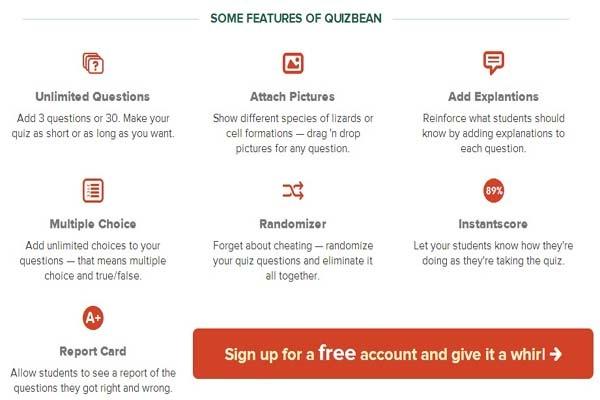
On logging in you can go ahead to create a new quiz, you’ll be asked to give your quiz a title and two answer choices. For now, QuizBean only works with two answers, and it is expected that more choices will be added soon. Now, you’re ready to start creating questions. To add your questions, just type the question and click “Add Another Question”. Plus, you can add an answer explanation and an image to be associated with the question as well. You also have the option to randomize the questions. When you’re finished with your quiz, you can send it out via link, email, Facebook and/or Twitter. Now, your students can head over to QuizBean and try it out. While the students are taking the quiz they will see a running total of their score and percentage so they can assess their own performance.

Some distinct features of QuizBean are the unlimited questions it offers for a quiz, the provision for an image to be added to the quiz, the ability to provide explanations along with the answers and shareable quizzes.


Prices:-

  1. Free:
    • 6 Quizzes
    • 51 Students
  2. $5/mo:
    • 26 Quizzes
    • 101 Students
  3. $10/mo:
    • Unlimited Quizzes
    • Unlimited Students


Our Review:– QuizBean turns out to be an easy and unique tool for making online tests. It currently has a lot of practical applications in the classroom. It could be a great opening activity to explore your students’ prior knowledge on a subject. It could also be used as a formative assessment tool if the teacher had the students create their own quizzes. The quizzes have an interactive look and feel about them that makes the user engagement rise considerably.

The feature that is really significant is that you can create explanations of the correct answer for your students to view immediately after trying each question in your quiz. This helps them learn in detail about where and why they went wrong. The explanation leaves an impression on them which helps them remember the correct answers easily. Another fascinating feature is that, illustrations in the form of images can be provided in the quizzes, which make them even more interesting and vivid.

Overall, while this new app still has some improvements and upgrades on the way, the simplicity and ease of use make it a worthwhile classroom tool. I’m certain that students will love using QuizBean because it gives them a sense of independence while using technology.


How to use it (Training Videos):-


Contact Us – To know on more how to use

TAGGED: Quiz, Social Media in Education, Students, Teachers/Educators, Tools for Teachers/Educators, Tools in Education
Share This Article
Facebook Twitter Whatsapp Whatsapp LinkedIn Reddit Telegram Email Copy Link
Previous Article South Sudan Worlds Youngest Country Developing New Education System 2nd Episode South Sudan World’s Youngest Country Developing New Education System (Part 2)
Next Article Zaya Bringing World Class Education to Every Neighborhood Zaya: Bringing World Class Education to Every Neighborhood
AdvertisementWhy this Ad?

Latest EdTech News To Your Inbox

Stay Connected

AdvertisementWhy this Ad?

Latest EdTech News To Your Inbox

Stay Connected

AdvertisementWhy this Ad?

You Might Also Like

Top 10 Montessori Teacher Training MTT Courses in India 2026-27 Edition
News

Top 10 Montessori Teacher Training (MTT) Courses in India: 2026-27 Edition

Sep 9, 2026
Top 10 Early Childhood Care and Education ECCE Courses for Teachers in India 2026-27
News

Top 10 Early Childhood Care and Education (ECCE) Courses for Teachers in India 2026-27

Sep 5, 2026
How to Create Consistent AI Videos with a Reference-to-Video Generator
Reviews

How to Create Consistent AI Videos with a Reference-to-Video Generator

Sep 2, 2026
How to Build Educational Apps That Drive Real Teacher and Student Adoption in 2026
Insight

How to Build Educational Apps That Drive Real Teacher and Student Adoption in 2026

Sep 1, 2026
Why AI Lesson Planning Tools Are Only Solving Half the Problem
Insight

Why AI Lesson Planning Tools Are Only Solving Half the Problem

Aug 31, 2026
How Learning Gaps Can Be Identified Before Assessment AI-Powered Insights
Research

How Learning Gaps Can Be Identified Before Assessment (AI-Powered Insights)

Aug 28, 2026
Best online career counselling in India  CCO counselling session with student and parents
News

Best Online Career Counselling in India 2026: Why Career Counselling Online Is the No.1 Choice for Students and Parents

Aug 21, 2026
Best English Speaking Apps in 2026 Which One Fits Your Goal
Reviews

Best English Speaking Apps in 2026: Which One Fits Your Goal?

Aug 10, 2026
Show More
EdTechReviewEdTechReview

H433, 2nd Floor, Vikaspuri, New Delhi, India, 110018
Phone: 011 41321030

Follow US

Copyright © EdTechReview. All Rights Reserved.

  • Home
  • Advertise
  • Event Associations
  • Press Release
  • About
  • Services
  • Contribute
  • News
  • Trend & Insight
  • Data & Statistics
  • eLearning
  • Reviews
  • Research
  • EdTech Voices
  • Dictionary
  • Tags
  • Resources
  • Events
  • Courses
  • EdTech Product for Review
  • Sponsored/Paid Post Service
  • Our Clients
  • FAQ’S
  • Contact Us
  • Important Links
  • Sitemap
  • Terms of Use
  • Privacy Policy
newsletter
Join 100K+ subscribers!

Subscribe to our weekly newsletter that brings the latest EdTech news, trends, insights, reports, interviews, etc. for educators, school leaders, entrepreneurs, investors, & others.

loader
Zero spam, Unsubscribe at any time.
Go to mobile version
Welcome Back!

Sign in to your account

Lost your password?