This website stores cookies on your computer. These cookies are used to improve your website experience and provide more personalized services to you, both on this website and through other media.
Accept
EdTechReviewEdTechReview
  • News
  • Trends
  • Insight
  • eLearning
  • Research
  • Dictionary
  • EdTech Voices
  • More
    • Data & Statistics
    • Reviews
    • AWS for Education
    • Events

    Resources

    • Infographics
    • Reports & Case Studies
    • Videos
    • Books
    • Webinar

    Needs

    • 1:1 Learning
    • 21st Century Education
    • 21st Century Leadership
    • 21st Century Learning
    • 21st Century Teaching
    • 3D Printing
    • More Tags

    For

    • Students
    • Teachers/Educators
    • Administrators
    • Entrepreneurs/Startups
    • Govt. Officials/Policymakers
    • Parents
Explore
Search
Contribute
  • Submit A Post
  • EdTech Trainers and Consultants
  • Your Campus EdTech
  • Your EdTech Product
  • Your Feedback
  • Your Love for Us
  • EdTech Product Reviews
ETR Resources
  • About
  • Mission/Vision
  • Team
  • Services
  • Testimonials
  • Authors
  • Sponsor
  • Partner
  • Advertise
  • Our Clients
  • Media Kit
  • Press Release
  • FAQ’S
Reading: The School App – Student Planner App for Your School
Aa
EdTechReviewEdTechReview
Aa
Search
  • News
  • Trends
  • Insight
  • eLearning
  • Reviews
  • Dictionary
  • EdTech Voices
  • Data & Statistics
  • Research
  • AWS for Education
  • Events
  • EdTech Voices
  • Tags
  • About
  • FAQ’S
  • Our Clients
  • Partner
Follow US
Home > Reviews > The School App – Student Planner App for Your School
Reviews

The School App – Student Planner App for Your School

Saomya Saxena
Saomya Saxena Published Feb 24, 2014
Share
7 Min Read
The School App - Student Planner
SHARE

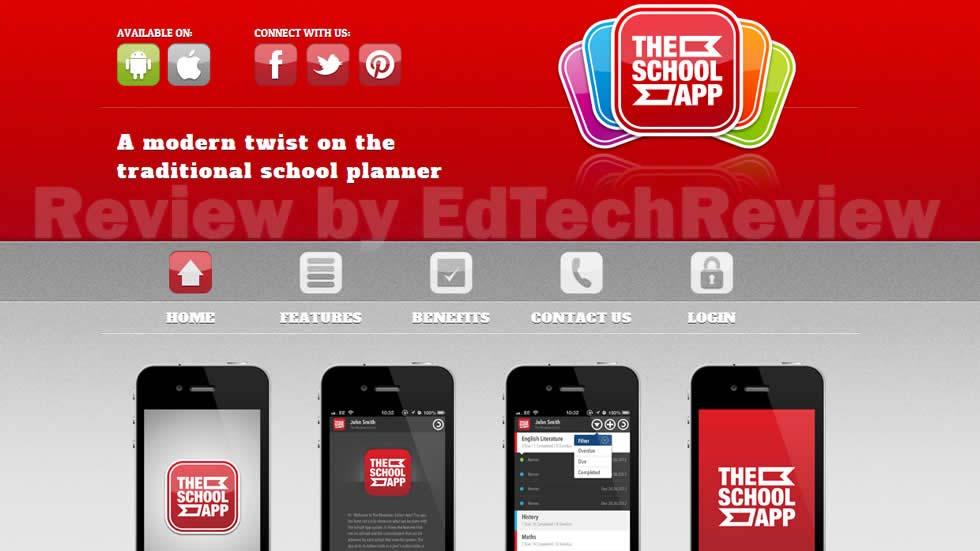
Student accounts are required for students to login to the app. Each student of the school is issued a username and password. These are created by administrators either individually or in bulk. Students can access all three app platforms (iOS, Android and Web). Once a student is logged into the app, they will see a Homepage which contains the school logo and short description. A student can go to the Homework screen by using the Homework tab in the navigation bar at the bottom of the app, here they can record and manage their homework and assignments. The Timetable area can be accessed by using the Timetable tab which allows students to view/edit their school timetable. Students can receive messages sent by administrators or teachers which are displayed in the Messages page, which is accessed by using the Messages tab. The most recent message is displayed at the top and when a new message is received the student will receive a push notification. Lastly, the Information area can be accessed using the Information tab. It allows students to view important school information in different sections namely, News, Documents, Calendar and Videos.

AdvertisementWhy this Ad?

The School App has many features such as, it is customized to each school and is designed using your school’s color scheme, name and logo. It displays the school’s information and policies and meets your schools requirements; the Timetable section where students can view their school timetable; the Homework section where students can enter details about their homework and assignments; the Diary section which records school’s key dates, it can be personalized by each student; the Messaging section where messages can be sent to students and alumni; and the Information section reflecting all important school information.

Prices: £2.29 per Student account per year.

Our Review: The School App replaces the traditional paper planners and allows students to use the technology on their phones, tablets or laptops to organize their studies. The main benefits of the app are that it reduces costs since it is less expensive than the traditional school planners, improves student engagement and organization, can be used by all students in your school due to its availability on various platforms, improves communication between school and students as messages can be directly sent to the devices of students and provides a fully synchronized Diary, Homework and Timetable.

The Web version of the app is also available so that students without a phone can access the full range of features from any computer connected to the Internet. Its service includes continuous use of the app with unlimited free messages, diary additions, all add updates and comprehensive support. The Alumni option allows schools to easily stay in contact with students who have passed out. The students have access to an up-to-date school diary with automatic reminders of upcoming events.

It was created to engage students with planning their school work more effectively, by utilizing their mobile phones. Go ahead and improve your school image by embracing this latest technology of a student planner app for your schools.

 Video Tutorials (Playlist): 


Previous Page12
TAGGED: Android/iOS Apps, BYOD, Learning Management System, Teachers/Educators, Technology in Education, Tools for Teachers/Educators, Tools in Education
Share This Article
Facebook Twitter Whatsapp Whatsapp LinkedIn Reddit Telegram Email Copy Link
Previous Article What New Role Does 21st Century Learning Create For Parents - Part 3 What New Role Does 21st Century Learning Create For Parents? – Part 3
Next Article Learning in the 21st Century Research Innovation and Policy - Part 1 Learning in the 21st Century: Research, Innovation and Policy – Part 1
AdvertisementWhy this Ad?

Latest EdTech News To Your Inbox

Stay Connected

AdvertisementWhy this Ad?

Latest EdTech News To Your Inbox

Stay Connected

AdvertisementWhy this Ad?

You Might Also Like

How AI and Smart Sensors Are Creating Safer Learning Environments
Trends

How AI and Smart Sensors Are Creating Safer Learning Environments

Jul 16, 2026
Common Challenges Schools Face When Moving to Digital Assessments
Insight

Common Challenges Schools Face When Moving to Digital Assessments

Jul 14, 2026
upEducators Top Choice for Becoming a Nursery Teacher in India
News

Why is upEducators the Top Choice for Nursery Teacher Training (NTT) Course in India?

Jul 7, 2026
Stop Teaching Students More Apps Teach Them How to Handle Files
eLearning

Stop Teaching Students More Apps, Teach Them How to Handle Files

Jul 3, 2026
Indian EdTech Has Been Solving the Problem It Can Bill For Not the One Children Have
Insight

Indian EdTech Has Been Solving the Problem It Can Bill For, Not The One Children Have

Jul 2, 2026
The Most Important Variable in Education Isnt AI
Insight

The Most Important Variable in Education Isn’t AI – What Building Live Instruction at Scale Actually Taught Me

Jun 26, 2026
Why AI-Powered Personalized Learning Is Becoming the New Standard in EdTech
Insight

Why AI-Powered Personalized Learning Is Becoming the New Standard in EdTech

Jun 25, 2026
Shortening the software learning cycle in a world of rapid releases
Insight

Shortening The Software Learning Cycle in a World of Rapid Releases

Jun 23, 2026
Show More
EdTechReviewEdTechReview

H433, 2nd Floor, Vikaspuri, New Delhi, India, 110018
Phone: 011 41321030

Follow US

Copyright © EdTechReview. All Rights Reserved.

  • Home
  • Advertise
  • Event Associations
  • Press Release
  • About
  • Services
  • Contribute
  • News
  • Trend & Insight
  • Data & Statistics
  • eLearning
  • Reviews
  • Research
  • EdTech Voices
  • Dictionary
  • Tags
  • Resources
  • Events
  • Courses
  • EdTech Product for Review
  • Sponsored/Paid Post Service
  • Our Clients
  • FAQ’S
  • Contact Us
  • Important Links
  • Sitemap
  • Terms of Use
  • Privacy Policy
newsletter
Join 100K+ subscribers!

Subscribe to our weekly newsletter that brings the latest EdTech news, trends, insights, reports, interviews, etc. for educators, school leaders, entrepreneurs, investors, & others.

loader
Zero spam, Unsubscribe at any time.
Go to mobile version
Welcome Back!

Sign in to your account

Lost your password?