This website stores cookies on your computer. These cookies are used to improve your website experience and provide more personalized services to you, both on this website and through other media.
Accept
EdTechReviewEdTechReview
  • News
  • Trends
  • Insight
  • eLearning
  • Research
  • Dictionary
  • EdTech Voices
  • More
    • Data & Statistics
    • Reviews
    • AWS for Education
    • Events

    Resources

    • Infographics
    • Reports & Case Studies
    • Videos
    • Books
    • Webinar

    Needs

    • 1:1 Learning
    • 21st Century Education
    • 21st Century Leadership
    • 21st Century Learning
    • 21st Century Teaching
    • 3D Printing
    • More Tags

    For

    • Students
    • Teachers/Educators
    • Administrators
    • Entrepreneurs/Startups
    • Govt. Officials/Policymakers
    • Parents
Explore
Search
Contribute
  • Submit A Post
  • EdTech Trainers and Consultants
  • Your Campus EdTech
  • Your EdTech Product
  • Your Feedback
  • Your Love for Us
  • EdTech Product Reviews
ETR Resources
  • About
  • Mission/Vision
  • Team
  • Services
  • Testimonials
  • Authors
  • Sponsor
  • Partner
  • Advertise
  • Our Clients
  • Media Kit
  • Press Release
  • FAQ’S
Reading: Toontastic 3D: Great App for Storytelling
Aa
EdTechReviewEdTechReview
Aa
Search
  • News
  • Trends
  • Insight
  • eLearning
  • Reviews
  • Dictionary
  • EdTech Voices
  • Data & Statistics
  • Research
  • AWS for Education
  • Events
  • EdTech Voices
  • Tags
  • About
  • FAQ’S
  • Our Clients
  • Partner
Follow US
Home > Reviews > Toontastic 3D: Great App for Storytelling
Reviews

Toontastic 3D: Great App for Storytelling

Priyanka Gupta
Priyanka Gupta Published Jul 31, 2017
Share
6 Min Read
Toontastic 3D Great App for Storytelling
Toontastic 3D: Great App for Storytelling
SHARE

Google has launched this amazing app for kids to help them showcase their imagination and creative kick with the power of storytelling.

AdvertisementWhy this Ad?

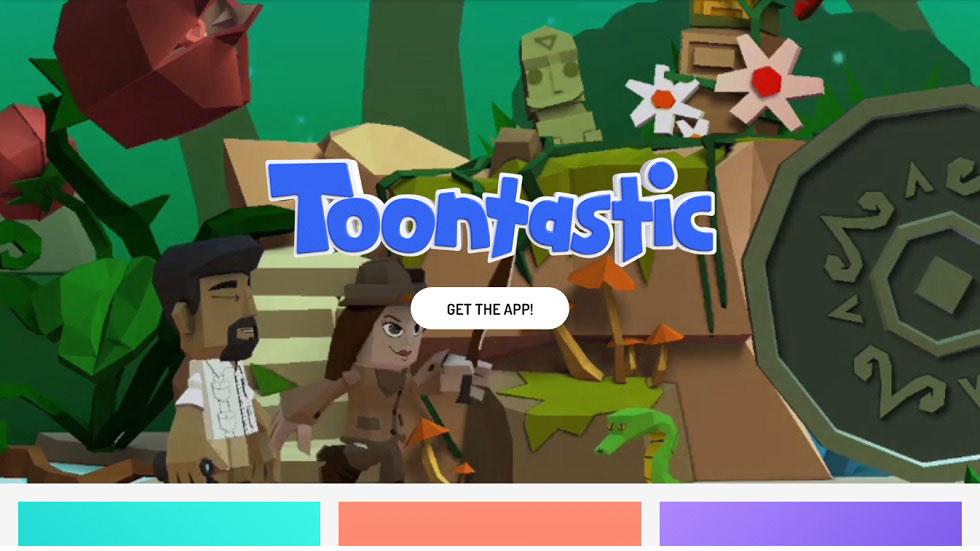
Kids love stories, either they get to hear them, see them or just tell them but they love stories a lot. Stories instill them with imagination and they are being able to give structure, face and figure to what they think of. With Toontastic 3D students can draw, animate, and narrate own cartoons. It’s as easy as play. Just move your characters around onscreen, tell your story, and Toontastic records your voice and animations and stores it on your device as a 3D video. Toontastic is a powerful and playful way to create adventures, breaking news reports, video game designs, family photo albums, and anything else students might imagine!

With so many web tools catering to this love of story telling what sets Toontastic 3D apart is the familiarity kids feel with the various characters they create. The app enables the kids to animate the characters of their story hence they are being able to make it just the way they want.

The tool is just the right fit for kids who are interested in making videos, loves to plat with cartoons and are brilliant to turn their ideas into 3D Cartoons. Now the tool not only helps students to get creative but also gives an educational value. The whole process teaches kids the basics of a story arc and plot points.

How The App Works:

1. The application is user friendly as it’s meant for kids. The first thing is to pick a type of animation. There are three options, a short story, a classic story and a science report. These stories are cut into scenes to help kids achieve their goal one at a time. Also, the small stages helps kids understand how the animation flows. For example, the classic story has prompts for setup, conflict, challenge, climax and resolution. The science report has question, hypothesis, experiment, result and conclusion parts. These clearly labeled parts shows kids what should be done in each scene.

2. Next, kids have to choose an environment or setting for their animations. Kids can draw their own setting, or choose from the ones available in the app. There is a cutting edge command center straight out of a spy movie, an ancient and mysterious temple, a typical classroom, a pirate ship, the lost city of Atlantis, a camp in the middle of the forest and a flying steampunk airship.

3. Now is the main thing i.e. to add characters to the scene. The app features many characters that can fit all the story line kids wish to demonstrate. Some of the characters are a robot, a jellyfish, a shark with machine legs, a mermaid and a gorilla. The characters are organized according to themes such as city, space, explorers and pirates. Alternatively, children can express their creativity and draw their own characters as well. The 2d drawings are automatically converted to 3D by the application.  Each scene can have a cast of up to 7 characters, and the same character can be added multiple times.

4. This I believe is the best part for kids. Now children have to record each scene, move around the characters or the background. Swiping moves the scene in different directions, and these movements are recorded. The characters can be directly manipulated with the finger, and made to move about the scene. Kids can record voice over narrations at this stage to explain what is happening, or provide dialogues to the characters. Toontastic 3D automatically adds the animations for turning and walking. Once the animations are set, the movements can be exaggerated or enhanced by setting a mood. Available moods include gloomy, tense, stormy and curious.

Watch this app trailer below to get a feel of the tool:

Important Points:

– What all can be made: Epic Capers, Historical films, Mysteries, Social Lessons, Cooking Shows, Silent Films, School Reports, Fan Fiction, Family Flicks, Buddy Films, SciFi, Documentaries, and Memes.

– The app comes with an idea lab full of playful stories, characters and settings to inspire new adventures.

– It works offline. The only feature requiring internet access is the idea lab, which showcases awesome cartoons by other kids. Also, it doesn’t require any sign ups. Once you download it you’re good to go!   

– You can save your cartoons to the device. Export your finished cartoon to the photo library, or Photos app, on your device.

– The app can be used by all who loves to tell stories especially great for kids aged 6-12.

– The app is compatible with Android and iOS. 

The tool seems promising and helps students showcase their imagination and creativity in a manner that engages them and teaches them the art of storytelling. We recommend educators and parents to give this app to their kids and help them explore it.

Share your experiences with us in the comment section below.   
TAGGED: Digital Storytelling, Free Apps and Tools, Teachers/Educators, Tools for Teachers/Educators, Tools in Education
Share This Article
Facebook Twitter Whatsapp Whatsapp LinkedIn Reddit Telegram Email Copy Link
Priyanka Gupta
By Priyanka Gupta
Follow:
Priyanka is an experienced edtech blogger with a passion for improving education through technology. She writes thought-provoking and informative articles on the latest trends and developments in the edtech space. Through her engaging writing style and insightful analysis, readers gain a deeper understanding of how technology is transforming the way we learn and teach. From AI-powered learning platforms to gamification and conventional teaching strategies in the 21st century, Priyanka covers a wide range of topics that are relevant to educators, students, and anyone interested in the future of education.
Previous Article How Can Teachers Use Google Keep How Can Teachers Use Google Keep
Next Article Infographic The Growth of Robotics in STEM Education Present & Future of STEM Education
AdvertisementWhy this Ad?

Latest EdTech News To Your Inbox

Stay Connected

AdvertisementWhy this Ad?

Latest EdTech News To Your Inbox

Stay Connected

AdvertisementWhy this Ad?

You Might Also Like

Common Challenges Schools Face When Moving to Digital Assessments
Insight

Common Challenges Schools Face When Moving to Digital Assessments

Jul 14, 2026
upEducators Top Choice for Becoming a Nursery Teacher in India
News

Why is upEducators the Top Choice for Nursery Teacher Training (NTT) Course in India?

Jul 7, 2026
Stop Teaching Students More Apps Teach Them How to Handle Files
eLearning

Stop Teaching Students More Apps, Teach Them How to Handle Files

Jul 3, 2026
Indian EdTech Has Been Solving the Problem It Can Bill For Not the One Children Have
Insight

Indian EdTech Has Been Solving the Problem It Can Bill For, Not The One Children Have

Jul 2, 2026
The Most Important Variable in Education Isnt AI
Insight

The Most Important Variable in Education Isn’t AI – What Building Live Instruction at Scale Actually Taught Me

Jun 26, 2026
How EdTech Platforms Are Empowering Students with Flexible Learning Opportunities
Insight

How EdTech Platforms Are Empowering Students with Flexible Learning Opportunities

Jun 22, 2026
VR Teacher Training Preparing Educators for Future-Ready Classrooms
Trends

VR Teacher Training: Preparing Educators for Future-Ready Classrooms

Jun 16, 2026
How AI Tools Are Changing the Way We Work Learn and Create
Trends

How AI Tools Are Changing the Way We Work, Learn, and Create

Jun 9, 2026
Show More
EdTechReviewEdTechReview

H433, 2nd Floor, Vikaspuri, New Delhi, India, 110018
Phone: 011 41321030

Follow US

Copyright © EdTechReview. All Rights Reserved.

  • Home
  • Advertise
  • Event Associations
  • Press Release
  • About
  • Services
  • Contribute
  • News
  • Trend & Insight
  • Data & Statistics
  • eLearning
  • Reviews
  • Research
  • EdTech Voices
  • Dictionary
  • Tags
  • Resources
  • Events
  • Courses
  • EdTech Product for Review
  • Sponsored/Paid Post Service
  • Our Clients
  • FAQ’S
  • Contact Us
  • Important Links
  • Sitemap
  • Terms of Use
  • Privacy Policy
newsletter
Join 100K+ subscribers!

Subscribe to our weekly newsletter that brings the latest EdTech news, trends, insights, reports, interviews, etc. for educators, school leaders, entrepreneurs, investors, & others.

loader
Zero spam, Unsubscribe at any time.
Go to mobile version
Welcome Back!

Sign in to your account

Lost your password?