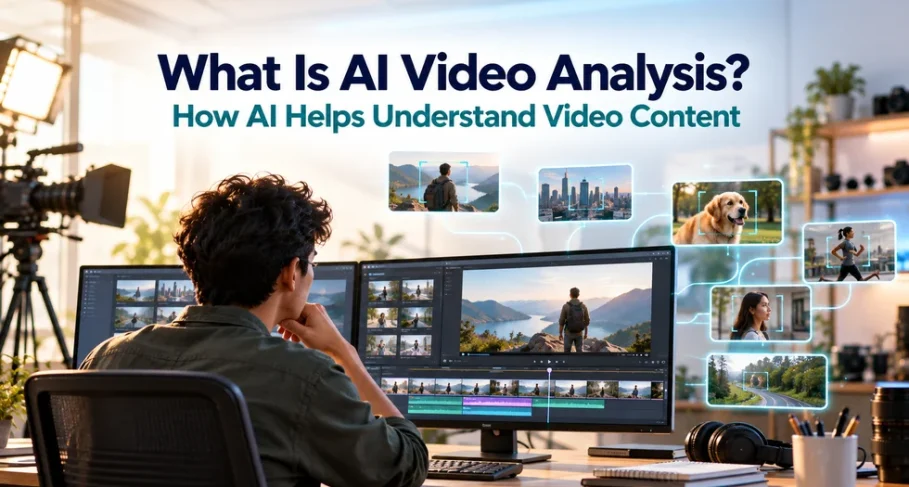
Multi-camera shoots demand hours of playback before editing even begins. This turns initial sessions into tedious reviews. Review time also scales worse than editing time, because every extra card of footage has to be played in full. AI video analysis can reduce this workload by examining footage and extracting useful information from its content.
It detects objects, actions, and other details while linking findings to relevant moments in the footage. Instead of relying entirely on manual logging, AI can turn analyzed content into searchable information. Filmora brings this capability into its media workspace, helping editors search and review imported footage without maintaining a separate catalog.
Part 1. What Is AI Video Analysis?
AI media analysis is the process of using artificial intelligence to examine video content and identify information from visual and audio data. According to Filmora, AI video analysis refers to a machine’s ability to analyze, obtain, and process information from visual sources. The technology can help identify objects, scenes, actions, speech, and other details that appear throughout a recording.
Manual video review becomes harder as footage grows, especially with multi-camera projects. AI media analysis can help creators find useful moments faster by turning footage into structured information, such as detected objects, scenes, speech, or other content details.
AI Video Analysis vs. Video Editing
The difference becomes clearer with larger projects. For a short personal clip, manually checking the footage may be faster. AI video recognition can reduce the time needed to locate specific scenes, people, or phrases. The table below explains the difference further:
| Video Analysis | Video Editing |
|---|---|
| Examines footage and extracts useful information | Changes footage to create a finished video |
| Detects objects, scenes, speech, and key moments | Cuts clips, adds effects, and adjusts visuals |
| Can generate tags, descriptions, or searchable data | Produces an edited video for viewing or sharing |
| Helps users find relevant moments in footage | Shapes pacing, sequence, and the final story |
Part 2. How AI Can Help Analyze Video Content
Once footage volume increases, the main challenge becomes finding the right information quickly. AI video analysis helps by scanning video content, detecting important details, and turning footage into searchable data.
What the Analysis Reads
AI-powered video content analysis usually works through several recognition tasks. Each task answers a different question about what appears in the footage.
- Image Classification: Categorizes video frames by their overall content, helping identify broad scenes such as indoor, outdoor, or nature footage.
- Localization: Identifies where a specific object appears within a frame, rather than simply detecting its presence.
- Object Detection: Recognizes different objects and identifies their positions within a frame, combining classification and localization.
- Object Identification: Distinguishes a specific object or person from others instead of recognizing only a general category.
- Object Tracking: Follows a detected object across multiple frames, helping determine its movement and presence throughout a video sequence.
Where Video Content Analysis Is Already Used
The value of AI video recognition becomes clearer as footage grows beyond what people can review efficiently. Industries use video content analysis to monitor live feeds, organize large video libraries, and extract useful information from recordings. Security systems can detect objects, movement patterns, and unusual activity. Media teams can tag and search footage, while retail and advertising platforms use recognition tools to identify relevant on-screen content.
What It Changes in an Editing Workflow
For editors, AI media analysis changes the way footage is searched and organized. Instead of opening clips one by one to find a specific take, editors can use searchable footage information to quickly locate relevant scenes, dialogue, or moments from a larger media library.
It also reduces the time spent organizing files manually. By creating metadata, tags, and searchable details from recorded footage, AI-assisted tools make it easier to manage projects and return to important clips during the editing process.
Part 3. AI Video Analysis vs. Manual Video Review
Both video content analysis and manual review aim to find useful information inside footage. However, the difference comes down to the time and effort required.
| Point of Comparison | AI-Assisted Analysis | Manual Video Review |
|---|---|---|
| Time Required | Processes large amounts of footage faster and can run without constant supervision. | Requires watching clips in real time and creating notes manually. |
| Handling Large Projects | Scales better when working with hundreds of clips or long recordings. | Becomes slower as footage volume increases. |
| Finding Details | Helps locate objects, people, speech, text, and timestamps. | Can understand context, emotion, timing, and creative details. |
| Consistency | Applies the same detection process across reviewed footage. | Results can vary depending on focus, workload, and reviewer experience. |
| Role in Editing | Useful for the first pass, searching, and organizing footage. | Important for selecting the final shots and shaping the story. |
How AI and Human Review Work Together
AI video recognition is especially useful during the first stage of footage review, when editors need to find relevant clips and organize large media libraries. It can narrow extensive footage into a more manageable selection. Human editors still guide creative decisions, including choosing strong performances, setting the right pacing, and interpreting the context of each scene.
AI supports editors rather than replacing them. Software can analyze videos and identify relevant content, but choosing which take best serves the story still requires human judgment. This makes AI analysis a useful capability within a video editor rather than a substitute for the editor.
Part 4. How Filmora’s AI Media Analysis Helps Find Relevant Footage
Finding useful clips can become difficult when a project contains a large amount of footage. Filmora’s AI Media Analysis helps examine imported videos and identify relevant content before editors spend time reviewing every clip manually.
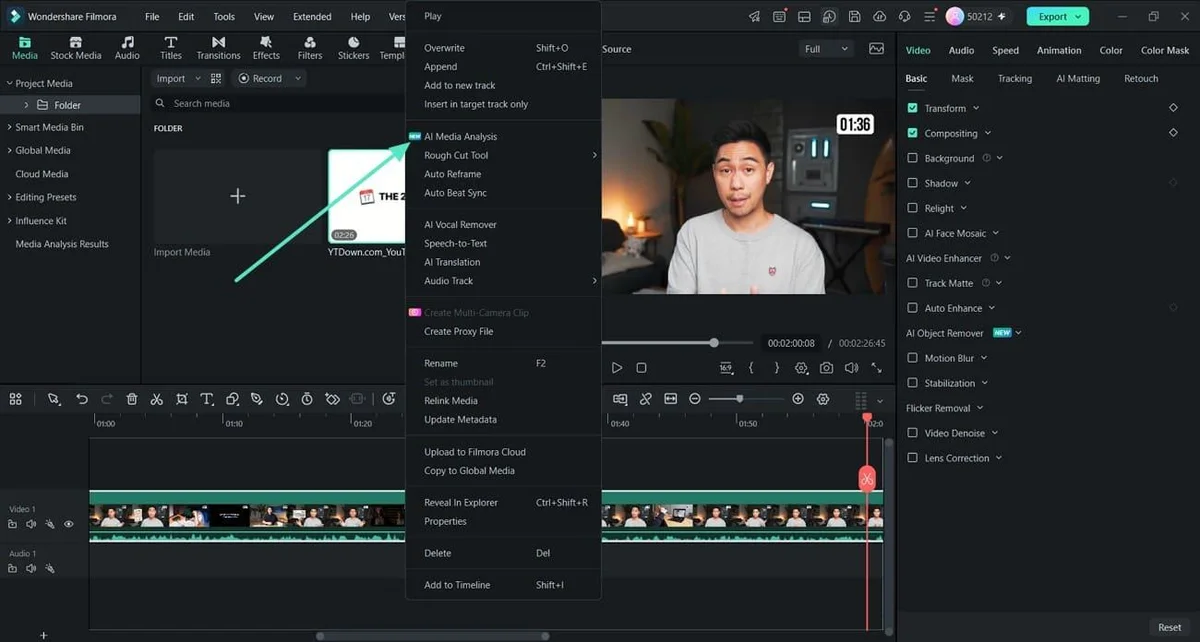
The feature works directly with videos in the Media panel. Right-click an imported video and select “AI Media Analysis.” Filmora then opens a separate window where you can select the media, review the required credits, and click “Generate” to start processing.
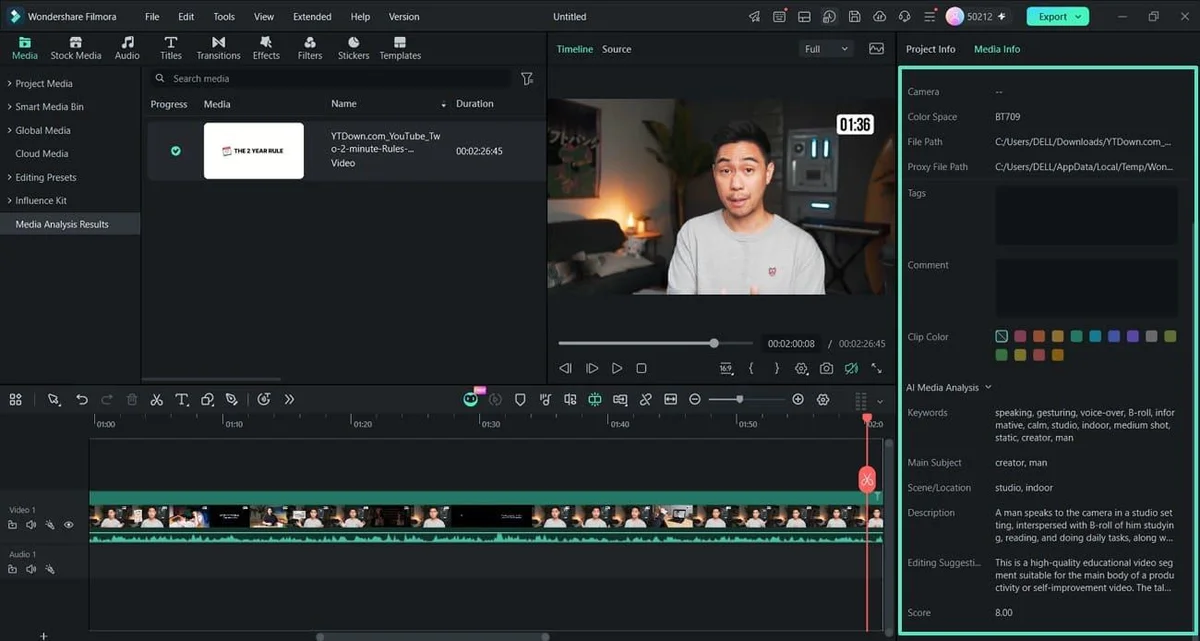
Once processing finishes, open “Media Analysis Results” from the left panel. Filmora displays the analyzed media with detected “Keywords” describing its content. These keywords make the footage easier to understand and help editors identify potentially relevant clips before continuing with the edit.
Conclusion
AI video analysis turns large amounts of footage into useful information, helping creators find relevant clips and organize media more efficiently. Filmora brings this capability into the editing workflow by analyzing imported footage and generating descriptive keywords. AI can reduce time spent reviewing media, while storytelling, pacing, and final editing decisions remain with the editor.
FAQs About AI Video Analysis
1. What is AI video analysis?
AI video analysis uses artificial intelligence to examine video content and extract useful information. Depending on the system, it can identify objects, people, scenes, speech, text, movement, and other details that help users understand and organize footage.
2. How is video content analysis different from video editing?
Editing alters the footage and outputs a finished video, while analysis leaves the source untouched and outputs information about it. One practical consequence is that analysis can run across material you never intend to use, since examining a clip changes nothing.
3. What can AI video recognition detect in footage?
Filmora describes the underlying tasks as classifying images, locating and detecting objects, identifying specific instances, and tracking movement across frames. Inside an editor, those combine into searching footage for objects, people, on-screen text, and dialogue.
4. Does AI analysis replace watching the footage yourself?
AI analysis can reduce the work involved in the first review, but it does not replace human judgment. Editors still need to assess pacing, tone, performance, and which takes best support the final story.