So you have completed your units and lessons.
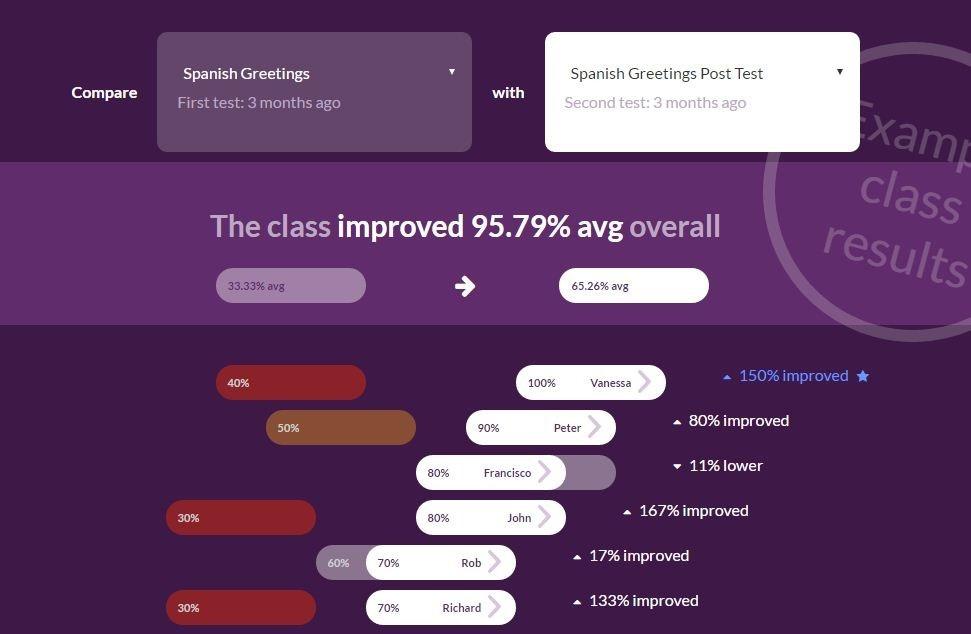
You made sure you covered everything with your students. You covered all the topics and you did everything you could to make them understand. Now its time for your students to take an assessment to check how well they have mastered the content. When you go through the result you are shocked to see some reds even when you covered them so well in class. I am sure you have faced this so many times. So the idea is to asses along teaching so that you know when students understand things completely.
Below is a list of tools that can help you asses student learning as you teach them for better understanding.
1) Nearpod
Nearpod is a classroom tool for teachers to engage students with interactive lessons & assessments that students can access on any device. It makes lectures more engaging through interactive multimedia presentations. With Nearpod, teachers can create mobile presentations, engage students in class, and assess them in real time. Teachers can deliver their existing content through mobile devices and get instant feedback from students through interactive features like polls, quizzes, drawing activities, and others. Students interact and submit responses through which teachers can monitor and measure their learning on individual and aggregate basis. The tool is highly accessible as iot can be used on iOS, Android, Windows or on Web.
2) Socrative
Educators can initiate formative assessments through quizzes, quick question polls, exit tickets and space races all with their Socrative app. Socrative will instantly grade, aggregate and provide graphs of results to help you identify opportunities for further instruction. It saves time and visualize student understanding when it matters. The app works 2 ways. Teachers download the Socrative teacher clicker and students download the Socrative student clicker. Teachers add the content in the form of quizzes and MCQs for students and students receive their work. Students submit their work and teachers can Asses students on individual level.
To download app:
Socrative Student: Android, iOS, Web
Socrative Teacher: Android, iOS, Web
Socrative is a simple, dynamic online student response system that can help teachers spark conversation and learning through user-created polls and quizzes.
3) Kahoot!
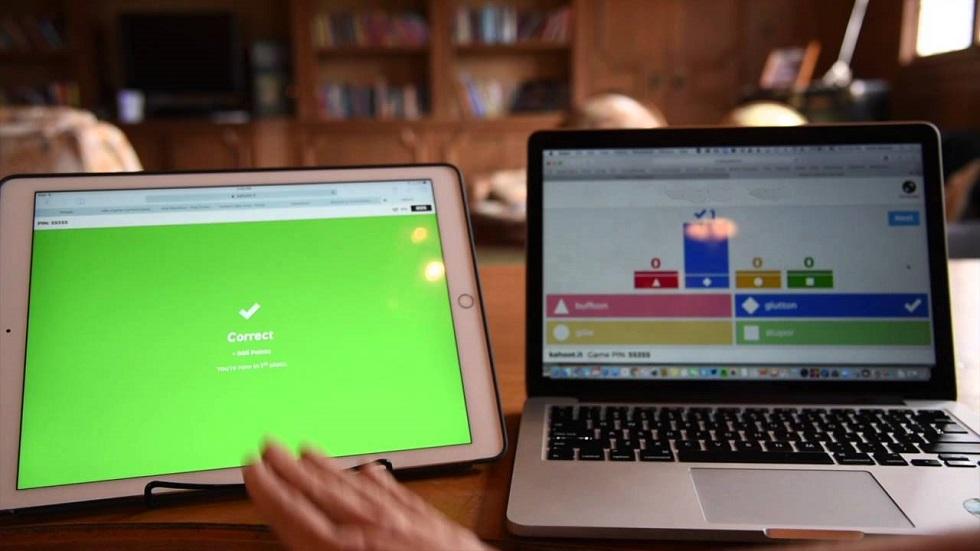
With kahoot teachers can create fun quizzes and add content that in turn is played by students in the form of competitive games. It works as a student response system, which turns the basis for the assessment of the students. Kahoot is helpful for students of all ages from kindergarten to older students. This tool can be used to assess any subject and any class. Questions, along with answer choices, are projected onto a classroom screen while students submit responses using a personal device. Teachers and students over 16 have access to publicly shared quiz templates, which can be used as-is or edited. Alternately, teachers and students can create their own new kahoots (games or quizzes).
Download their Android app here.
4) Plickers
It is a simple tool that enables teachers collect real time formative assessment data without the need for student devices.
How does it works:
Students are given a set of QR codes on large index cards. The codes are assigned to students. Each code card can be turned in four orientations. Each orientation provides a different answer. When the teacher is ready to collect data, s/he can use Plicker mobile app to scan the card to see a bar graph of responses. While holding quizzes, instead of making them raise their hands, students can just raise their cards with their answers and teachers can scan their responses.
Plicker app is available for both Android and iOS users.
5) EdPuzzle
With EdPuzzle, teachers can convert any video into lesson. With access to simple video-editing tools with powerful analytics, a teacher can take a video and make it personal, engaging and effective. Instead of giving YouTube links to students, teachers can edit a video, assign them to students and quiz them as they go. Teachers can also know how many times a student access that very video and get a clue about the understanding level of the student. Teachers can also add voice and question in the videos that can turn any video into video notes. Currently, the tool is available on iOS, chrome extension and YT extension with an android version soon to be launched.
6) Blubbr
It is a quiz creation service with which teachers can create ‘Trivs’ or quizzes from YouTube videos easily. Quizzes can be about anything hence there is no bar to the grade you teach. Teachers can search videos on the desired topic on Blubbr itself and make Trivs to add fun and engagement in their classrooms. The structure of the quizzes has a viewer watch a short clip than answer a multiple choice question about the clip. Also user can sort their Trivs based on the Trivs created, played, and saved as drafts. For collaboration, users can share their trivs on social networking platforms like Facebook or Twitter. Can be accessed by anyone, as it is a web based platform and does not require any particular OS.
It is a unique interactive whiteboard for tablets and phones running iOS, Android and Windows. It lets user annotate, animate, and narrate explanations and presentations. Teachers can create dynamic interactive lessons, activities, assessments, and tutorials using Explain Everything’s flexible and integrated design. Explain Everything records on-screen drawing, annotation, object movement and captures audio via the iPad microphone. The tool is amazing to assess students’ performance and keeps student interested by the means of interactive and engaging lesson activities.
8) ExitTicket
An exit ticket is a device that students use to communicate with their teacher as to how their learning is going for them and this online tool is an engaging student response system delivering instant feedback and performance metrics to teachers and students, allowing immediate intervention and reteaching with a tap of a finger, while tracking the student’s progress. Students can view instant assessment scores and overall performance over time, all aligned to Common Core. The system supports BYOD or 1:1 teaching techniques. ExitTicket revolves around teachers creating and assigning “Tickets,” which are just series of questions. First, teachers choose which type of “ticket” they want to create that can be in the form of poll, practice exit, quiz or exam, and then they add the name and update the characteristics (time allotted, assignment date, etc.) for that particular “ticket.” Teachers can also align tickets to learning targets or specific standards. Then they add the specific questions, choosing from multiple choice, free-response or true/false. Once completed, teachers can send out that “ticket,” and students can immediately begin answering the questions. Teachers can track student and class performance in real-time.
This amazing tool can be accessed over web, iOS or Android.
9) EduCreations
This tool turns your device into a recordable whiteboard. User can create amazing video tutorial and explain any concept. Sharing thoughts with others also becomes easy as you can even share videos via email, Facebook, Twitter, Edmodo or YouTube, or download and store them in Dropbox or Google Drive. All of your videos are stored safely in the cloud and are accessible everywhere you need them. With this tool you can help students take control of their learning and master each new concept, Spend more time engaging students one-on-one and create time for hands-on learning.
Replay students’ work to pinpoint misconceptions, assess them on their work and get a knack of where your student is lacking and celebrate their successes.
You can get your hands on this amazing tool either on web or on iOS.
Do you use any of the tools mentioned above?
Are you aware of any other tool that can help teachers assess students in better ways?
Share your experience and insights with us in the comment section below.